[ANN] ConvolutionInterpolations.jl: Smooth multi-dimensional high order of accuracy interpolation

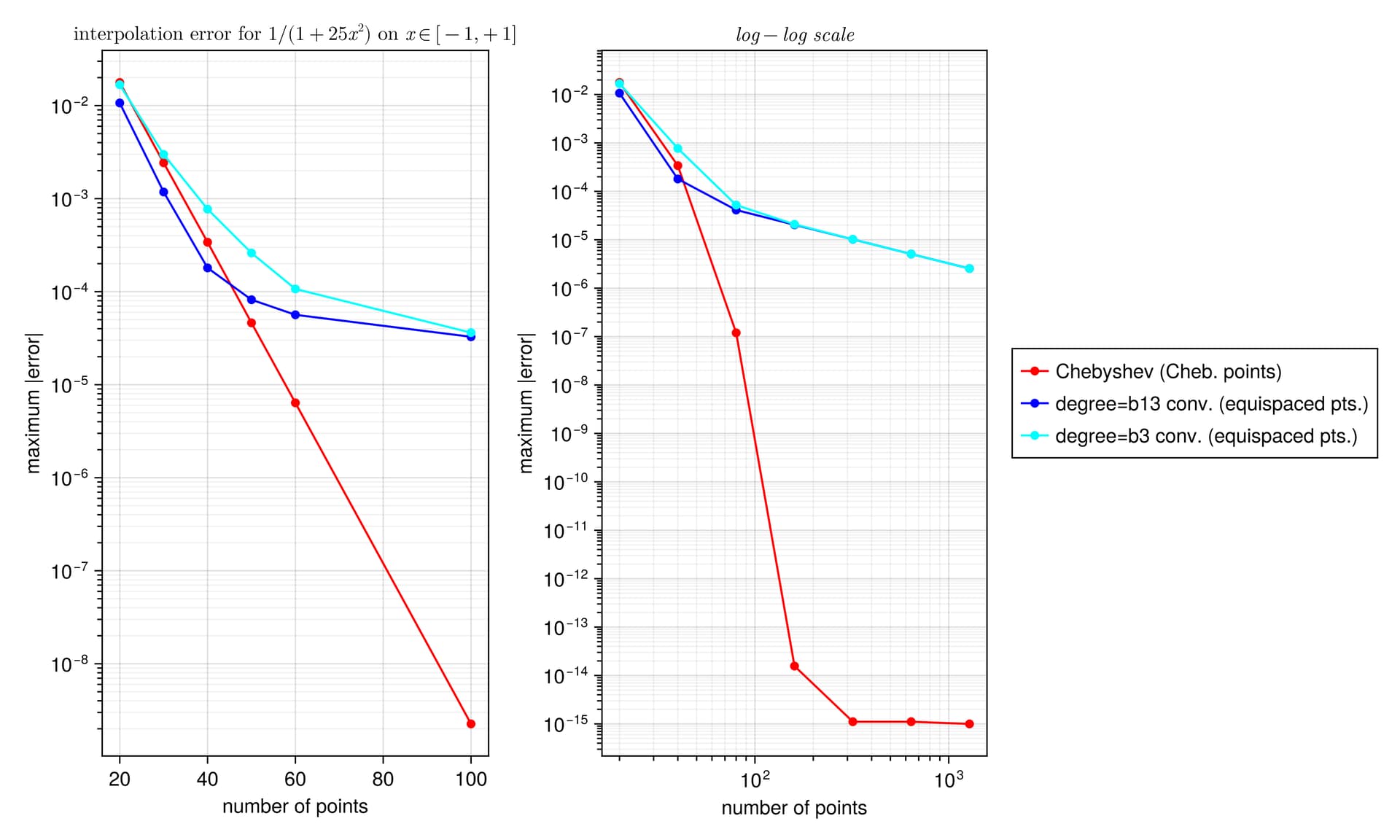
I did a quick test with these interpolants on the Runge test function 1/(1+25x^2) on x \in [-1,1], looking at the maximum error maximum(abs.(interp.(x) .- exact.(x))) at 10^5 equispaced points x = range(-1, 1, length=10^5), plotting the convergence as a function of the number of interpolation points.

I found something strange to me: if I compare your degree-13 kernel :b13 to the degree-3 kernel :b3, the former is more accurate at first, but asymptotically they have the same accuracy. Why doesn’t the high-order kernel converge faster?

Am I missing something?
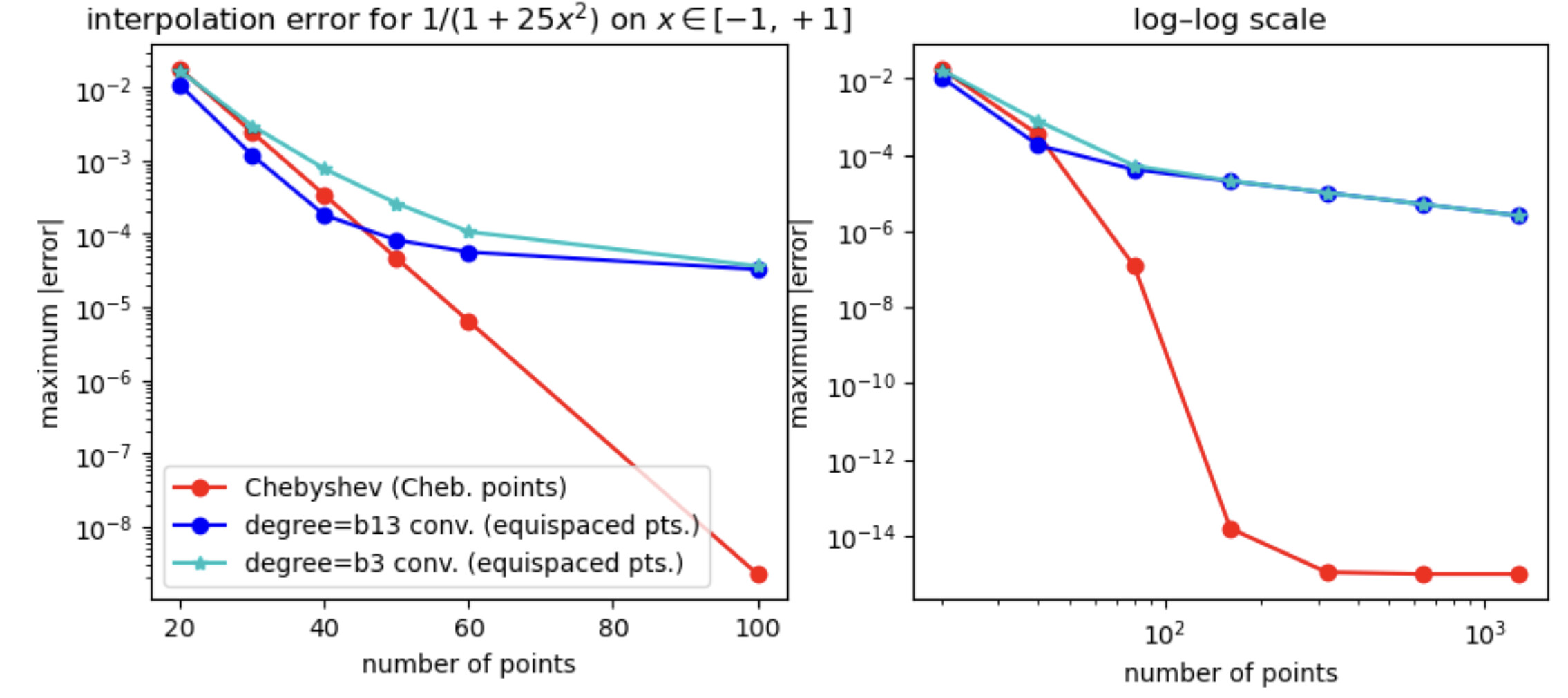
For comparison, I’ve also included the FastChebInterp.jl polynomial interpolation using the same number of Chebyshev points, which converges exponentially with the number of points. Of course, there are lots of circumstances where you are forced to use equispaced points and cannot use Chebyshev points!

Code
using ConvolutionInterpolations, FastChebInterp

runge(x) = inv(1+25x^2)
xf = range(-1, 1, length=100000)
yf = runge.(xf)

ns = [20,30,40,50,60,100]
errs = [
    begin
        xc = chebpoints(n, -1,1)
        c = chebinterp(runge.(xc), -1,1)
        xr = range(-1,1, length=n)
        itp3 = convolution_interpolation(xr, runge.(xr); degree=:b3);
        itp13 = convolution_interpolation(xr, runge.(xr); degree=:b13);
        maximum(@. abs(c(xf) - yf)), maximum(@. abs(itp3(xf) - yf)), maximum(@. abs(itp13(xf) - yf))
    end for n in ns
]

nslog = [20,40,80,160,320,640,1280]
errslog = [
    begin
        xc = chebpoints(n, -1,1)
        c = chebinterp(runge.(xc), -1,1)
        xr = range(-1,1, length=n)
        itp3 = convolution_interpolation(xr, runge.(xr); degree=:b3);
        itp13 = convolution_interpolation(xr, runge.(xr); degree=:b13);
        maximum(@. abs(c(xf) - yf)), maximum(@. abs(itp3(xf) - yf)), maximum(@. abs(itp13(xf) - yf))
    end for n in nslog
]

using PyPlot
figure(figsize=(10,4))

subplot(1,2,1)
semilogy(ns, getindex.(errs, 1), "ro-")
semilogy(ns, getindex.(errs, 3), "bo-")
semilogy(ns, getindex.(errs, 2), "c*-")
xlabel("number of points")
ylabel("maximum |error|")
legend(["Chebyshev (Cheb. points)", "degree=b13 conv. (equispaced pts.)", "degree=b3 conv. (equispaced pts.)"])
title(L"interpolation error for $1/(1+25x^2)$ on $x \in [-1,+1]$")

subplot(1,2,2)
loglog(nslog, getindex.(errslog, 1), "ro-")
loglog(nslog, getindex.(errslog, 3), "bo-")
loglog(nslog, getindex.(errslog, 2), "c*-")
xlabel("number of points")
#ylabel("maximum |error|")
#legend(["Chebyshev (Cheb. points)", "degree=b13 conv. (equispaced points)", "degree=b3 conv. (equispaced points)"])
title("log–log scale")
6 Likes

I believe the confusion is less about methodology and more about terminology.

1 Like

Thank you for your insightful comment @stevengj :slight_smile:

The explanation is that the higher order kernels suffer more under the precomputed kernels, at least for densely sampled signals (truncating the kernel to a fixed number of points rather than recomputing expensive polynomials for each call).
If you set fast=false you will see that kernels larger than :b3 converge faster than :b3, at least for the first few hundred samples (the :b3 is published in the paper I cited, it is 4th order, while mine are 7th order, based on when the Taylor series vanished during derivation).
However, I am still a bit puzzled that those curves ‘bend’ and asymptotically approach a limiting accuracy. I suspect this occur due to the limited order of the boundary conditions used, which ultimately end up limiting the accuracy.
Using higher order boundary condition is unfortunately not feasible in general, since in most cases this will make the interpolation not behave well.
On the other hand I’m very satisfied that there’s actually valid competition with Chebyshev at least for sparsely sampled signals (clearly not on densely sampled!). :slight_smile:

1 Like

Code:

using ConvolutionInterpolations
using Plots
using FastChebInterp

runge(x) = 1 ./(1+25*x^2)
xf = range(-1, 1, length=10_000)
yf = runge.(xf)

ns = [10,20,40,80,120,240]
cerrors = []
itpb3_errors = []
itpb5_errors = []
itpb7_errors = []
itpb9_errors = []
itpb11_errors = []
itpb13_errors = []
for n in ns
    xc = chebpoints(n, -1,1)
    c = chebinterp(runge.(xc), -1,1)
    xr = range(-1,1, length=n)
    itpb3 = convolution_interpolation(xr, runge.(xr); degree=:b3, fast=false, kernel_bc=[(:quadratic,:quadratic)]);
    itpb5 = convolution_interpolation(xr, runge.(xr); degree=:b5, fast=false, kernel_bc=[(:quadratic,:quadratic)]);
    itpb7 = convolution_interpolation(xr, runge.(xr); degree=:b7, fast=false, kernel_bc=[(:quadratic,:quadratic)]);
    itpb9 = convolution_interpolation(xr, runge.(xr); degree=:b9, fast=false, kernel_bc=[(:quadratic,:quadratic)]);
    itpb11 = convolution_interpolation(xr, runge.(xr); degree=:b11, fast=false, kernel_bc=[(:quadratic,:quadratic)]);
    itpb13 = convolution_interpolation(xr, runge.(xr); degree=:b13, fast=false, kernel_bc=[(:quadratic,:quadratic)]);
    push!(cerrors, maximum(abs.(c.(xf) - yf)))
    push!(itpb3_errors, maximum(abs.(itpb3.(xf) - yf)))
    push!(itpb5_errors, maximum(abs.(itpb5.(xf) - yf)))
    push!(itpb7_errors, maximum(abs.(itpb7.(xf) - yf)))
    push!(itpb9_errors, maximum(abs.(itpb9.(xf) - yf)))
    push!(itpb11_errors, maximum(abs.(itpb11.(xf) - yf)))
    push!(itpb13_errors, maximum(abs.(itpb13.(xf) - yf))) 
end
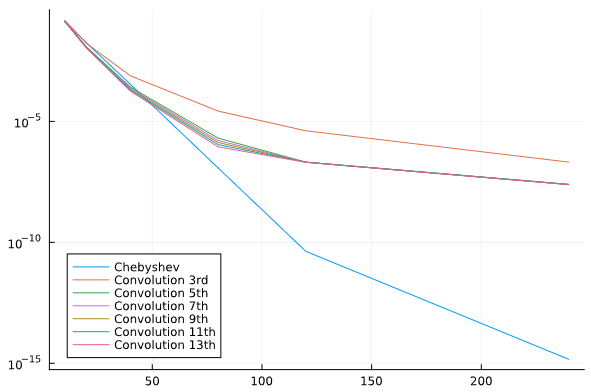
plot(ns, cerrors, yscale=:log10, label="Chebyshev", dpi=1000, legend=:bottomleft)
plot!(ns, itpb3_errors, label="Convolution 3rd", dpi=1000)
plot!(ns, itpb5_errors, label="Convolution 5th", dpi=1000)
plot!(ns, itpb7_errors, label="Convolution 7th", dpi=1000)
plot!(ns, itpb9_errors, label="Convolution 9th", dpi=1000)
plot!(ns, itpb11_errors, label="Convolution 11th", dpi=1000)
plot!(ns, itpb13_errors, label="Convolution 13th", dpi=1000)

Plot:

1 Like

Meta-comment: With such beautiful Julia code in this thread, it would be a shame to see the results displayed using PyPlot by a distinguished steward. Here is a beginner’s version using Makie:

Makie code
using GLMakie

f = Figure(size=(1000, 600))

ax1 = Axis(f[1, 1], yscale=log10, title = L"interpolation error for $1/(1+25x^2)$ on $x \in [-1,+1]$",
    xlabel="number of points",  ylabel="maximum |error|", yticks= yticks=LogTicks(-9:-1),
    yminorticksvisible = true, yminorgridvisible = true, yminorticks = IntervalsBetween(9)
)
scatterlines!(ns, getindex.(errs, 1), color=:red, label="Chebyshev (Cheb. points)")
scatterlines!(ns, getindex.(errs, 3), color=:blue, label="degree=b13 conv. (equispaced pts.)")
scatterlines!(ns, getindex.(errs, 2), color=:cyan, label= "degree=b3 conv. (equispaced pts.)")

ax2 = Axis(f[1, 2], xscale=log10, yscale=log10, title = L"log-log\ scale",
    xlabel="number of points",  ylabel="maximum |error|",
    xticks=LogTicks(1:4), yticks=LogTicks(-16:-1),
    xminorticksvisible = true, xminorgridvisible = true, xminorticks = IntervalsBetween(9),
    yminorticksvisible = true, yminorgridvisible = true, yminorticks = IntervalsBetween(9)
)
scatterlines!(nslog, getindex.(errslog, 1), color=:red)
scatterlines!(nslog, getindex.(errslog, 3), color=:blue)
scatterlines!(nslog, getindex.(errslog, 2), color=:cyan)

Legend(f[1, 3], ax1)
f
11 Likes

From your plot, there is barely any point in going beyond 5th order in your package?

2 Likes

I agree, the improvement with going higher than degree 5 (quintic kernel) is actually quite small, compared to the growth in the computational burden (more equations+higher degree polynomials). I am grateful that you made me more aware of this fact and I will update the package and documentation so that kernel degree=:b5 will be the default, and recommend using it in the documentation. However, there is an improvement with higher degrees, especially for sparse sampling, even though it is not large, so I still believe it is justified keeping the higher degree kernels, even though they might not be worth the cost in many cases (especially in high dimensions). :slight_smile:

1 Like

WENO (weighted essentially non-oscillating) interpolation would be a nice addition. It does higher order interpolants without introducing rining at sharp boundaries, and also can neatly handle the border cases. There is already one julia packae that does it.
What it does is a weighted interpolation between possible stencils based on the local finite differences.

1 Like

Some of us come from MATLAB… Perhaps a few macros that map the familiar MATLAB plot commands to Makie might attract us old timers. PyPlot does that.

1 Like

I’ve been able to fix the boundary condition issue.
Now my quintic kernel converges too, although slower than Chebyshev (but on uniform points).
Furthermore it needs only 6 samples to reproduce quintics exactly. :slight_smile:
I will add this to the package in an upcoming release.

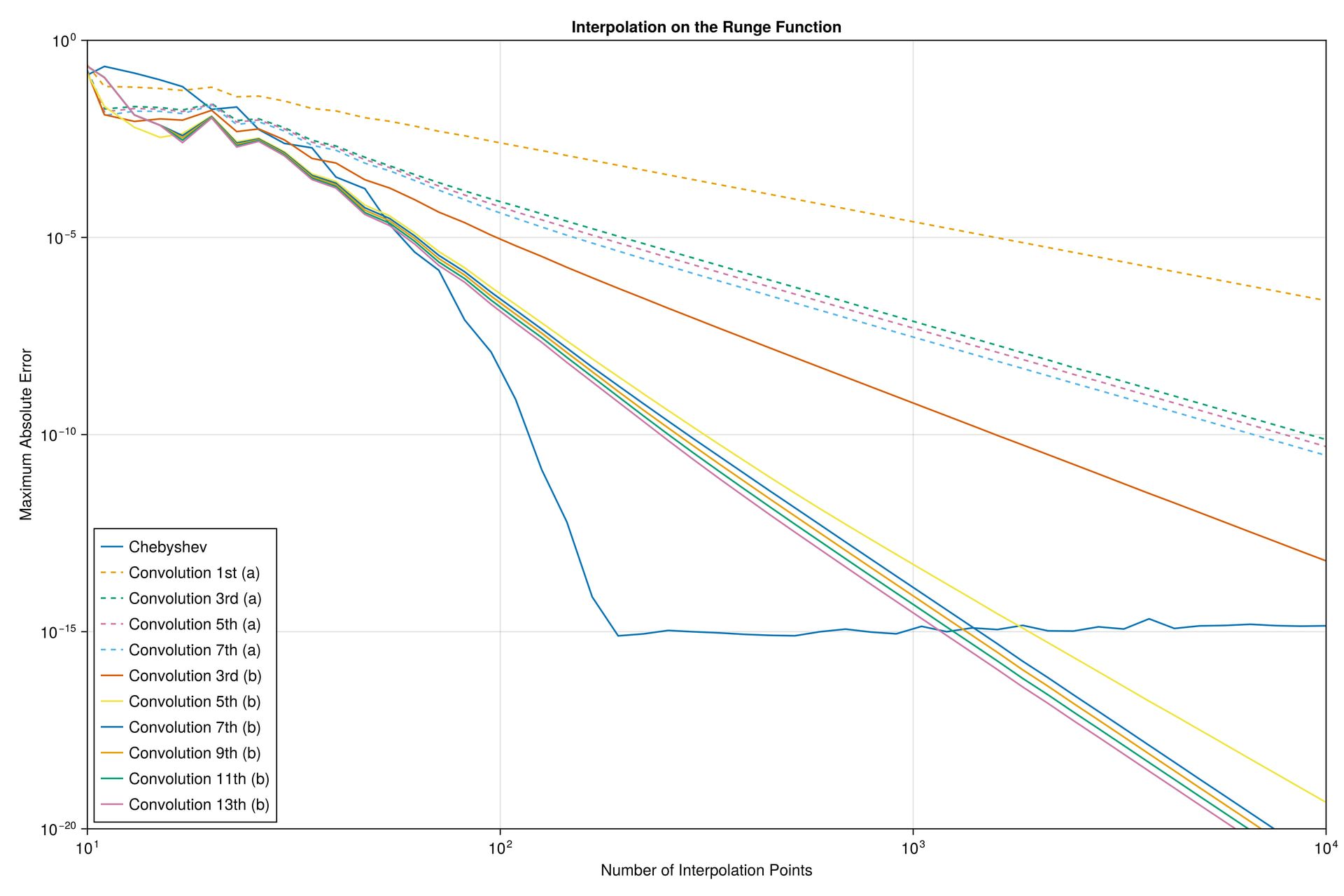
EDIT: This plot shows interpolation on the Runge function btw.

1 Like

Inspired by your plots, I’ve made these new Makie plots below. :slight_smile:
I’ve found a new way to do the boundary conditions which allow all of my kernels to converge.
The convergence is generally powerlaw (linear on loglog), so not as good as Chebyshev (exponential, linear on loglinear).
However, for sparsely sampled signals (<~50 points in [-1;1] on the Runge function), my kernels achieve lower maximum absolute error than Chebyshev.
Similarly, my package will now get support for BigFloat, which enables it to achieve lower error than the current implementation of Chebyshev in the FastChebInterp package I’m comparing to (I’m aware Chebyshev interpolation is likely not limited like that in itself).
I’ll release a new version one of the coming days. :slight_smile:

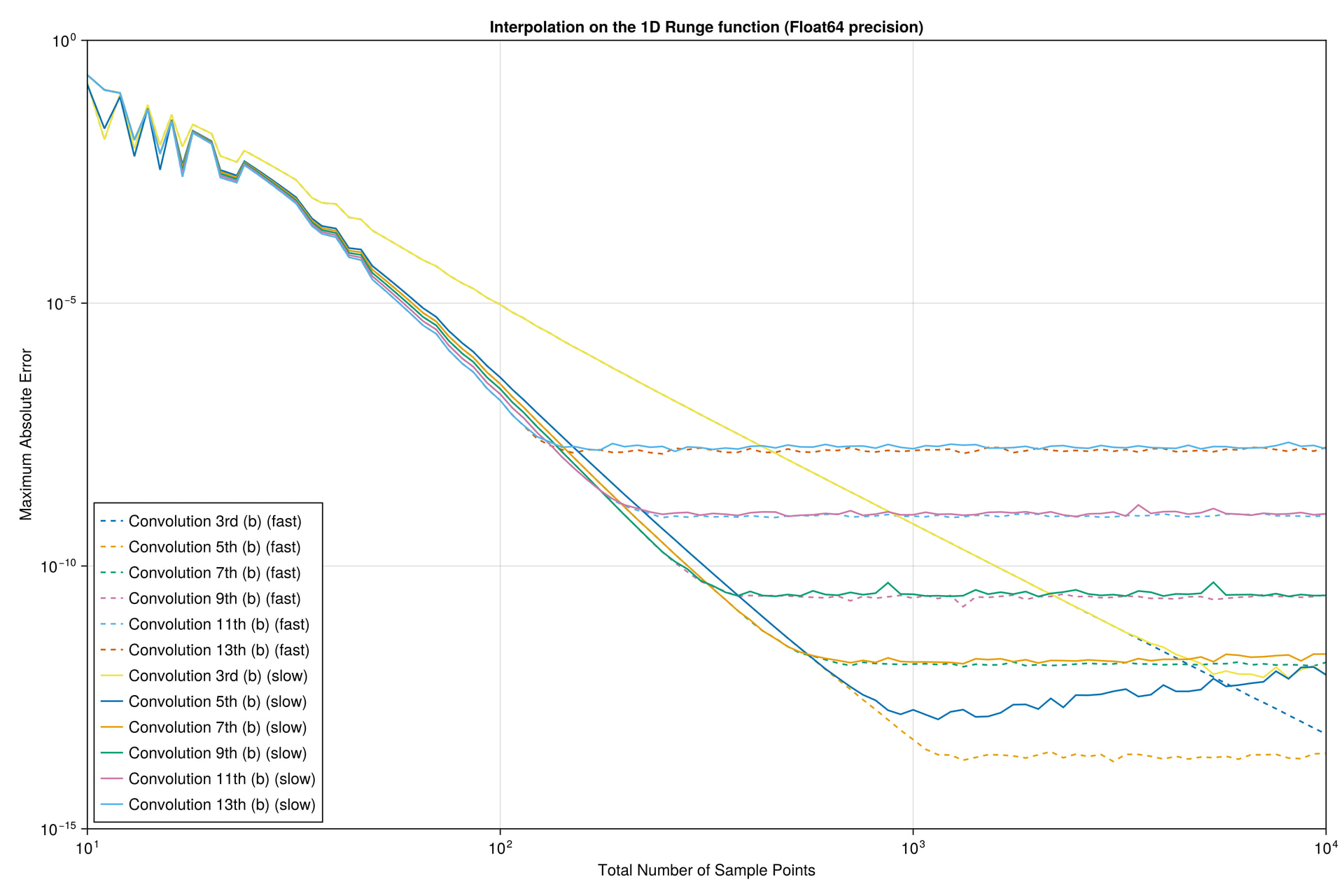
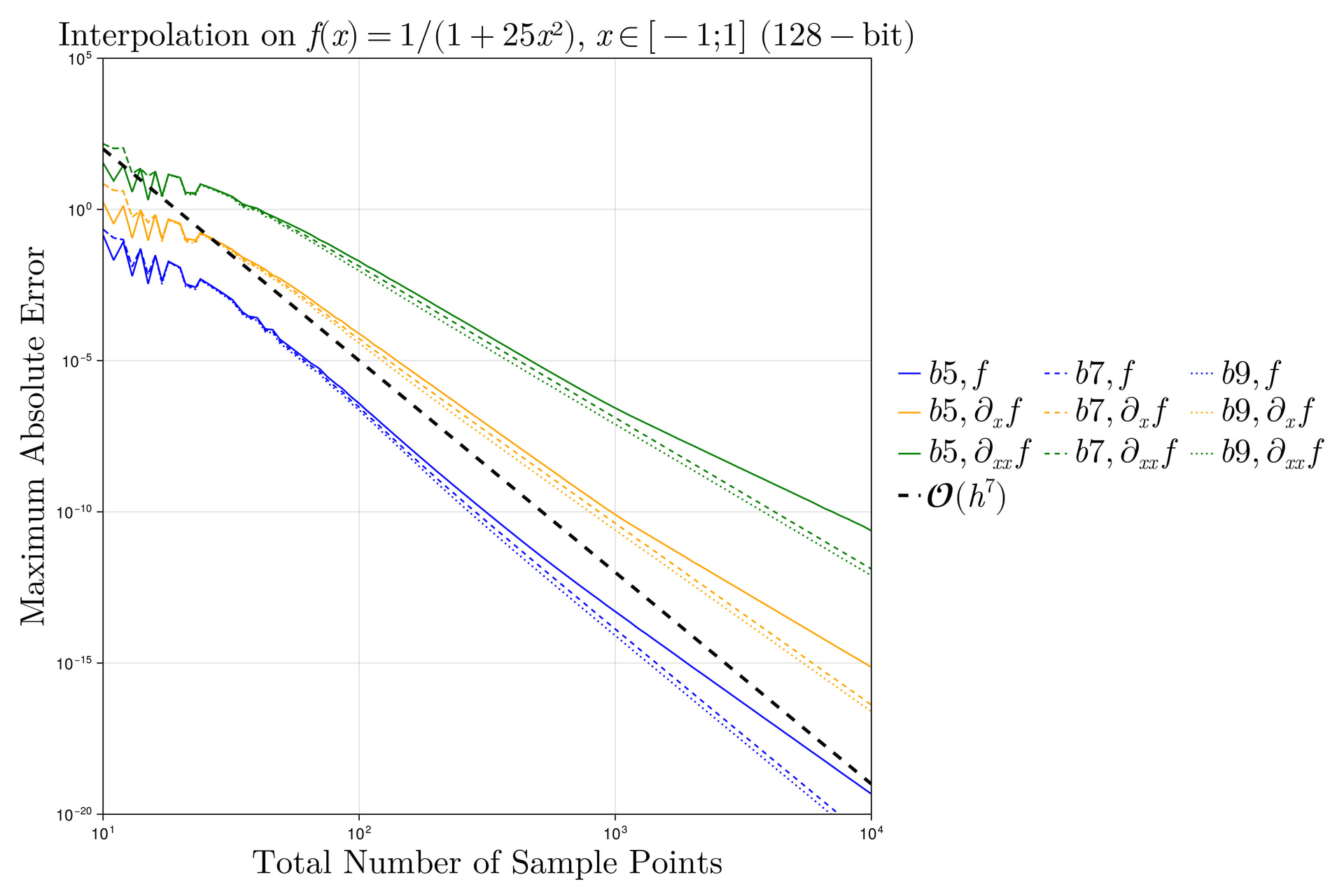
64-bit interpolation comparison (convolution methods plateau):

128-bit interpolation comparison (convolution methods converge linearly):

1 Like

There still seems to be almost no benefit in going beyond 5th order (and the higher-order methods plateau at a larger minimum error in 64-bit precision)?

The fast O(n \log n) chebinterp function is currently limited to precisions supported by the fast DCT (which calls the external C library FFTW). In principle, I could call FastTransforms.jl or GenericFFT.jl (wrapping a DCT function around it, since that can be computed with a complex FFT of real-symmetric data) to support arbitrary precision.

However, you can still use BigFloat (etc.) with the O(n^2) algorithm in chebregression, which is equivalent to Chebyshev interpolation if you use Chebyshev points x and pass order=length(x)-1.

2 Likes

There still seems to be almost no benefit in going beyond 5th order (and the higher-order methods plateau at a larger minimum error in 64-bit precision)?

I agree. I just included the 128-bit plot to show that the kernels actually -can- converge, but they’re limited by precision, and not by the method itself (other than convergence rate). But I agree that the :b5 kernel has the best overall tradeoff, it is also more efficient to evaluate.

The fast chebinterp function is currently limited to precisions supported by the fast DCT (which calls the external C library FFTW). In principle, I could call FastTransforms.jl or GenericFFT.jl (wrapping a DCT function around it, since that can be computed with a complex FFT of real-symmetric data) to support arbitrary precision.
However, you can still use BigFloat (etc.) with the algorithm in chebregression, which is equivalent to Chebyshev interpolation if you use Chebyshev points x and pass order=length(x)-1.

Thank you, I didn’t realize that. It is likely unnecessary with BigFloat precision in most applications anyway. But it is nice to know that there’s a way around this if one really needs it. :slight_smile:

1 Like

I’ve been able to go past the numerical/polynomial noise floor for the cubic and quintic kernels. I’ve done this by updating the fast kernels to use linear interpolation between the nearest kernel points, instead of a simple truncated nearest neighbor lookup. So now the :b5 kernel is the best choice across the full range. Below is convergence for 1d, 2d and 3d, where 2d and 3d only shows the fast kernels, since the direct kernel evaluation becomes expensive.

Below a 1D plot showing the convergence saturation levels that depend on the kernel complexity. The :b5 kernel is the best, and the fast kernel achieves the lowest error.

The next plot shows convergence on an adapted 2D Runge function: 1/(1+25x^2+25y^2). Notice the x-axis shows the total number of samples, not just one dimension. All kernels apart from the :b13 keep converging, but at a slower rate for high sample density.

The last plot shows convergence on the 3D Runge function 1/(1+25x^2+25y^2+25z^2). Convergence is slower, but still an acceptable level of error, 5 orders of magnitude smaller than the maximum function value of 1.

I’ll also add to the package that it uses :b5 and fast as the default settings. And I’ll add a step that precomputes polynomials once, for the fast interpolation, and stores them in a cache using Scratch.jl, as the kernel polynomials are universal and data independent.

1 Like

There was an error in the 2D implementation/plot. Now I corrected that and it converges like the 1D case and the fast :b5 kernel is the most accurate again (notice the y-axis of the plot starts at 1e-15 like the 1D case now):

Also, I found a type instability in the >=4D fast convolution, which I’ve corrected. I will release the new version soon. :slight_smile:

2 Likes

The plot below compares the convergence of my kernels to the Chebyshev implementation of FastChebInterp.jl and the cubic spline implementation of Interpolations.jl, with my :b5 kernel highlighted also. It shows that the :b5 kernel falls in-between Chebyshev and cubic splines with regard to convergence on the Runge function.

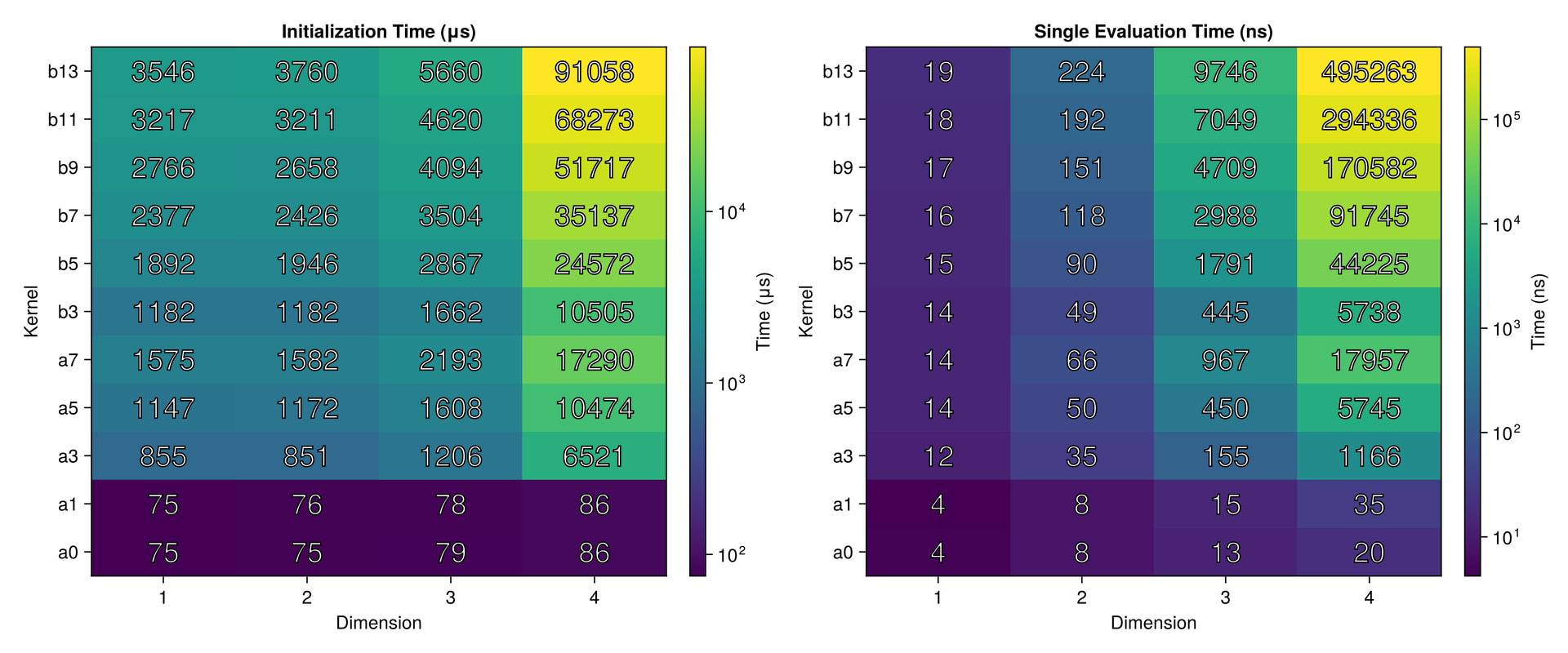
Other than optimizing accuracy, I’ve also been able to optimize performance, by eliminating searches and doing direct lookups. The table/heatmap shows the timings of my fast optimized kernels, where the left is interpolator setup and the right is kernel evaluation. Notice that the 1d linear and nearest neighbor implementations take around 4 ns for a single evaluation. In general the performance of my fast linear interpolation implementation now matches that of Interpolations.jl. In 1d, all of my kernels are <20 ns, and kernels can be selected to match desired accuracy/smoothness. In higher dimensions smaller kernels should be preferred, due to the timing explosion of the higher order kernels in high dimensions, which stems from the tensor product structure.


The cubic spline of Interpolations.jl evaluates at around 8.6 ns on my machine. While the higher order kernels of ConvolutionInterpolations.jl cannot exactly match this timing (around 2x slower), they offer a wide range of accuracy and dimensions, and generally have lower errors for a given number of samples.

2 Likes

Now the new version 0.2.0 has been released, this represents a very significant upgrade, please do check it out. Despite its low semantic number, I feel this package has already become quite mature, and includes many novel contributions. :slight_smile:

I updated the readme and also provided detailed release notes, highlighting the boundary condition breakthrough for higher order kernels, as well as docstrings for all structs, functions and constants.

Furthermore, I included the Python script which I used to derive all of the kernels symbolically, as well as the Julia script which I used to generate the optimal polynomial ghost points for a given kernel. Both scripts are included in the ‘gen’ (generation) folder.

I hope you will try out this package. The interface is very similar to Interpolations.jl, while offering great flexibility with regard to polynomial reproduction, continuity/smoothness, boundary conditions/extrapolation, as well as fast and competetive allocation-free performance.

3 Likes

I figured out I can do various forms of interpolation on the subgrid: The next version will feature an additional possibility of controlling subgrid interpolation. Options will include :nearest, :linear (current method), :cubic (hermite), :quintic (hermite). Using the hermite splines on the subgrid, I’ve been able to reduce the length of precomputed matrices from 1e5 to just 100 which reduces memory overhead, increases both precompute/caching/load and compute speed. With these improvements my :b5 kernel is now at <11 ns, even closer to the cubic spline of Interpolations.jl, while preserving the 7th order convergence in the full range.

The idea is: For :nearest I find the nearest subgrid point and convolve this range with the data. For :linear I find the two nearest subgrid points, convolve both with the data and linearly interpolate between these convolutions. However, the major improvements come with the hermite splines :cubic and :quintic: Instead of simply convolving the data, I can exploit that my new b kernels are highly smooth. Therefore I can convolve, not only the function values, but also first/second derivatives. Then I can do a hermite spline on the subgrid using the convolutions of the kernels values and derivatives with the data, to allow for a much coarser subgrid.

Furthermore, the next version will allow the user to directly calculate the derivatives, since I’ve ‘predifferentiated’ all of the kernels up to their highest smooth derivative, allowing fast and ~7th order accurate direct calculation of higher order derivatives on any uniformly spaced grid. :slight_smile:

3 Likes

At some point you should think about using this to provide optimized ChainRules.jl and Enzyme rules. Differentiation with respect to the coordinates can use your predifferentiated kernels, while differentiation with respect to the input data can use the linearity of the interpolation (so that the derivative with respect to the data is simply another interpolation rule of the same type).

3 Likes

Thank you for the idea, I like it, even though I don’t know how to do it. :slight_smile:

Other than that, I’ve been able to break the ‘plateau-curse’ of numerical precision. Now my kernels can reach machine precision in 64-bit, see the figures below. I did this by using Julia’s excellent feature of exact rational arithmetic. When I stay in exact arithmetic (Rational{BigInt}) as long as possible, no precision is lost during the precalculation of the polynomial values and their derivatives. This way one can get both the speed of 64-bit and the increased precision of exact arithmetic. Since only 100 points were precalculated for these plots, and their values are stored in a persistent cache, precalculation gives minimal overhead. If users need high accuracy derivatives too, they can simply switch to increased numerical precision, and the truncation of the exact arithmetic will be applied accordingly. :slight_smile: I’m in the process of predifferentiating all of the coefficients by hand (I don’t trust AI with such a task of precision, even though any error fails loudly with these kinds of exponents).


1 Like