libimagequant is a GPL Rust library (originally C, ported to rust by the maintainers) which performs color quantization (available from the command line as pngquant). I got it building with Binary Builder and wrote a small Julia wrapper called LibImageQuant.jl to make it easier (and slightly more efficient) to use from Julia. Instead of saving a PNG to disk and then calling pngquant, you can do it in-memory with quantize_image(figure_or_matrix).
LibImageQuant.jl is in the 3-day waiting period for registration, and will likely be available tomorrow. In the meantime, you can do pkg> add https://github.com/ericphanson/LibImageQuant.jl if you want to try it out.
Color quantization
Color quantization is a neat and intuitive technique to reduce file size of images with few distinct colors: instead of saving the RGB values for each pixel separately, save the “palette” of colors once, and then just store indices into that palette for each pixel, to look up the appropriate color.
Reducing to 256 colors can already reduce file size by 2-3x, and you can often find another 2x by shrinking the number of colors further. I have found color quantization quite useful with large plots (EEG traces in my case) for which I need sharp images. Some image viewers like MacOS’s preview will struggle with 10 MB images, and Slack won’t preview them, etc, but a 5x reduction is well enough to get them into “usable” range, and color quantization doesn’t make them blurry, unlike reducing resolution. I was using pngquant for this and became interested in learning more about how it worked and wrapping libimagequant.
As this technique relies on the image not having a lot of distinct colors, it works well for basic plots, and even some heatmaps can look decent. It does not do well with photographs or similar images with many nuanced colors.
I have some more details in the README as well.
Usage
Given a matrix mat with ColorTypes.jl entries, you can call quantize_image(mat) to get back an IndirectArray, which is exactly an array with a lookup vector (of colors) and index-into-lookup-vector entries. This can be saved with PNGFiles or similar.
There is also a Makie extension, so you can pass a figure (Makie.FigureLike) into quantize_image to again get back an IndirectArray you can save out. This way
using CairoMakie
fig = scatter(rand(10, 2))
save("my_plot.png", fig)
becomes
using CairoMakie, LibImageQuant
fig = scatter(rand(10, 2))
save("my_plot.png", quantize_image(fig); filters=0)
Note: filters=0 isn’t strictly necessary, but often helps shrink sizes further.
Examples
Here’s a simple scatter plot which works reasonably well down to ~4 colors.
| Setting | File size | Result |
|---|---|---|
| Original (no quantization) | 520 KB | |
| 256 colors (default) | 188 KB | |
| 16 colors | 140 KB | |
| 4 colors | 92 KB | |
| 2 colors | 72 KB |


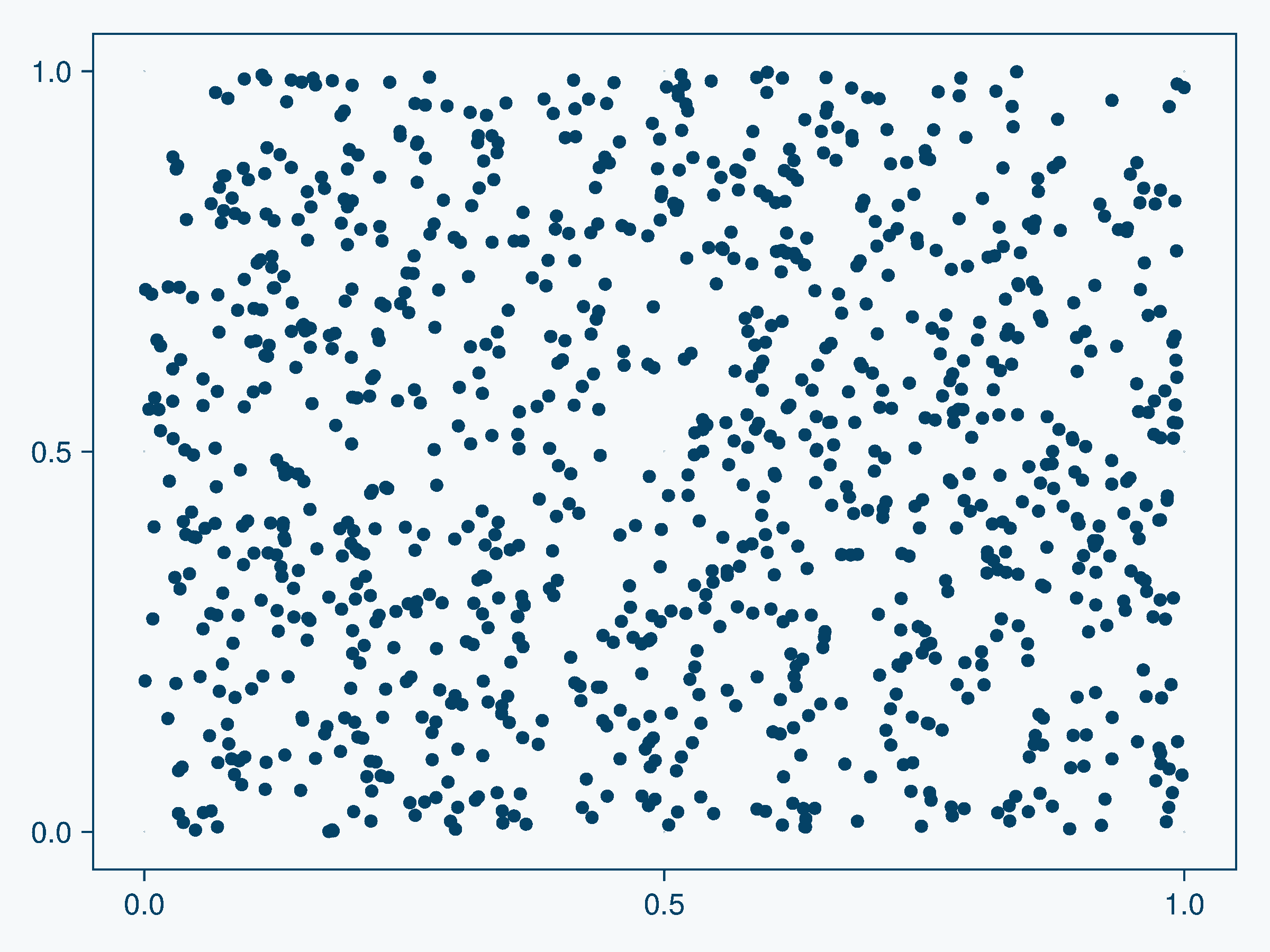
Here’s a photograph I took last week of a grey heron; it does not quantize so well! I’ve included a crop of its head so you can see the effects of quantization even at 256 colors.
| Setting | File size | Full image | Crop |
|---|---|---|---|
| Original (no quantization) | 2.5 MB |  |
|
| 256 colors | 898 KB |  |
|
| 16 colors | 355 KB |  |
|
| 4 colors | 181 KB |  |
|
| 2 colors | 127 KB |  |


It does make a kind of neat effect  .
.
Are there clear breakpoints in file size as you quantize further?
Not really! Here’s how file size varies with number of colors for that scatter plot example from earlier:

I expected to see big jumps in file size savings around 16, 4, and 2 colors, since at 2 colors you only need 1 bit per pixel; at 4 you need 2 bits, and at 16 you need 4 bits (no 8 colors / 3 bits cutoff, as the PNG spec doesn’t allow that). Instead there’s a giant spike at 3! I’m not sure why the spike is there, but I think the smoothness comes from the post-hoc compression. For example, if you have 20 colors, then you need 8 bits per pixel (because you’re above the cutoff of 16 colors for 4 bits per pixel). But you’re only using certain bit patterns and some of those extra bits are unused. Then the compression algorithm (DEFLATE) can compress that overhead out quite efficiently.
Beyond PNG
JPEG XL is a new(ish) format which also supports color palette quantization automatically (no need for libimagequant).
cjxl --distance 5 --modular=1 original.png original.jxl
seems to give reasonably good results here. --distance is “how far” can the output image be from the input image; it goes up to 25. --modular=1 forces it to use the “modular mode” which works better for synthetic images like plots. Using the scatter plot example again, this invocation brought it to 124 KB (below the 16 colors PNG size above) with no loss of quality that I can see. One could also quantize with libimagequant then pass it to cjxl to encode as JPEG XL, but that doesn’t seem to help the file size at all (cjxl probably already makes good choices for color quantization internally).
The downside is that JPEG XL is not supported as well by other software; e.g. I can’t upload the image to Discourse here; in slack, it detects images as “binary” and does not display a preview; VSCode dosen’t preview them, etc. MacOS Preview does work, and web browsers are starting to gain support it sounds like.
Julia also lacks a wrapper for libjxl, which would be the analog to PNGFiles.jl for libpng. This would be a great contribution if anyone is up for it:
- compile libjxl with BinaryBuilder to create
libjxl_jll - libjxl has a comprehensive C api, which one could generate a wrapper with Clang.jl. You can see LibImageQuant.jl/gen for how I did this for libimagequant_jll
- Write higher-level functions to compose the C functions together to save out an image or read in an image
- Interface with ImageIO.jl to support automatic format selection with
save("image.jxl", my_figure).