# Type-Stable Function to Return Plots.Plot
**URL:** https://discourse.julialang.org/t/type-stable-function-to-return-plots-plot/131359
**Category:** Performance
**Tags:** question
**Created:** [August 5, 2025, 9:03am UTC](https://discourse.julialang.org/t/type-stable-function-to-return-plots-plot/131359 "2025-08-05T09:03:50Z")
**Posts on this page:** 10
**Page:** 1
### Author:  [@ziolai](https://discourse.julialang.org/u/ziolai)
#### Post date: [August 5, 2025, 9:03am UTC](https://discourse.julialang.org/t/type-stable-function-to-return-plots-plot/131359/1 "2025-08-05T09:03:50Z")
The question below was already raised at [This post](https://discourse.julialang.org/t/is-it-possible-to-define-a-type-stable-function-that-returns-a-plots-plot-object/112172).
This code
```julia-auto
using Plots
function foo()
#..Initialize the plot..
p = plot()
return p
end
function gnu()
#..Initialize the plot..
p = plot()::Plots.Plot{Plots.GRBackend}
# return p
end
```
yields the output
```julia-auto
@code_warntype foo()
```
```julia-auto
MethodInstance for foo()
from foo() @ Main In[14]:3
Arguments
#self#::Core.Const(foo)
Locals
p::Plots.Plot
Body::Plots.Plot
1 ─ (p = Main.plot())
└── return p
```
and
```julia-auto
@code_warntype gnu()
```
```julia-auto
MethodInstance for gnu()
from gnu() @ Main In[14]:11
Arguments
#self#::Core.Const(gnu)
Locals
p::Plots.Plot{Plots.GRBackend}
Body::Plots.Plot{Plots.GRBackend}
1 ─ %1 = Main.plot()::Plots.Plot
│ %2 = Plots.Plot::Core.Const(Plots.Plot)
│ %3 = Plots.GRBackend::Core.Const(Plots.GRBackend)
│ %4 = Core.apply_type(%2, %3)::Core.Const(Plots.Plot{Plots.GRBackend})
│ %5 = Core.typeassert(%1, %4)::Plots.Plot{Plots.GRBackend}
│ (p = %5)
└── return %5
```
What is a type-stable definition of a function that returns a plot? Thx.
---
### Author:  [@sgaure](https://discourse.julialang.org/u/sgaure)
#### Post date: [August 5, 2025, 9:16am UTC](https://discourse.julialang.org/t/type-stable-function-to-return-plots-plot/131359/2 "2025-08-05T09:16:32Z")
`Plots.plot()` is not type stable. Its return type depends on global variables:
```julia-auto
julia> using Plots
julia> typeof(plot())
Plots.Plot{Plots.GRBackend}
julia> unicodeplots()
Plots.UnicodePlotsBackend()
julia> typeof(plot())
Plots.Plot{Plots.UnicodePlotsBackend}
```
For most purposes I’d guess the performance problems from this instability is negligible compared to the actual work done by the plot routines.
---
### Author:  [@ziolai](https://discourse.julialang.org/u/ziolai)
#### Post date: [August 5, 2025, 10:18am UTC](https://discourse.julialang.org/t/type-stable-function-to-return-plots-plot/131359/3 "2025-08-05T10:18:28Z")
Many thx!
In the target application, `Plots.plot` is called inside a for-loop over elements in a array. See function `plotMesh` below. The array is typically large. The function appears to be slow.
Possibly the code design is faulty to start with. Not sure whether an in-place version, a plotting recipe or an alternative is more appropriate here.
Please advice.
```julia-auto
function plotMesh(mesh::Mesh)
#..Initialize the plot..
p = Plots.plot(xlabel = "x", ylabel = "y",legend = false,aspect_ratio = :equal)
#..loop over number of elements..
for element in mesh.Elements
triangle = Shape([Tuple(element.p1),Tuple(element.p2),Tuple(element.p3)])
p = Plots.plot!(p,triangle,fillcolor=:blue, alpha=0.7, linecolor=:black)
end
Plots.plot(p)
return p
end
```
---
### Author:  [@sgaure](https://discourse.julialang.org/u/sgaure)
#### Post date: [August 5, 2025, 10:26am UTC](https://discourse.julialang.org/t/type-stable-function-to-return-plots-plot/131359/4 "2025-08-05T10:26:48Z")
> [@ziolai](#):
>
> ```julia-auto
> function plotMesh(mesh::Mesh)
>
> #..Initialize the plot..
> p = Plots.plot(xlabel = "x", ylabel = "y",legend = false,aspect_ratio = :equal)
>
> #..loop over number of elements..
> for element in mesh.Elements
> triangle = Shape([Tuple(element.p1),Tuple(element.p2),Tuple(element.p3)])
> p = Plots.plot!(p,triangle,fillcolor=:blue, alpha=0.7, linecolor=:black)
> end
>
> Plots.plot(p)
>
> return p
> end
>
> ```
You can put the loop in a separate function to utilize a function barrier:
```julia-auto
function plotloop!(p, Elements)
for element in Elements
triangle = ...
Plots.plot!(p, triangle, ...)
end
end
function plotMesh(mesh::Mesh)
p = Plots.plot(xlabel, ...)
plotloop!(p, mesh.Elements)
...
end
```
In this way there is a single instability inside `plotMesh`, but inside `plotloop!` there is no instability since the type of `p` is fully known when `plotloop!` is called. (Note that it’s not necessary to reassign `p` in `p = Plots.plot!(p, ...)` since `plot!` returns the original `p`, but updated.)
Edit: on second thought, `plot!` is not specializing on the plot type, so this may not help a lot. It could be that the slowness are from something else, like garbage collection due to the many vectors created when you construct the `Shape`.
---
### Author:  [@sgaure](https://discourse.julialang.org/u/sgaure)
#### Post date: [August 5, 2025, 10:31am UTC](https://discourse.julialang.org/t/type-stable-function-to-return-plots-plot/131359/5 "2025-08-05T10:31:36Z")
It might be worthwhile to create a separate plot receipe for your Mesh type, but it depends on how much you use such plots: [Overview · Plots](https://docs.juliaplots.org/latest/recipes/)
---
### Author:  [@ziolai](https://discourse.julialang.org/u/ziolai)
#### Post date: [August 5, 2025, 10:54am UTC](https://discourse.julialang.org/t/type-stable-function-to-return-plots-plot/131359/6 "2025-08-05T10:54:37Z")
Right!
The code below continues to be slow due to many allocations.
```julia-auto
function plotloop!(p,mesh::Mesh)
#..loop over number of elements..
for element in mesh.Elements
triangle = Shape([Tuple(element.p1),Tuple(element.p2),Tuple(element.p3)])
Plots.plot!(p,triangle,fillcolor=:blue, alpha=0.7, linecolor=:black)
end
return p
end
function plotMesh(mesh::Mesh)
#..Initialize the plot..
p = Plots.plot(xlabel = "x", ylabel = "y",legend = false,aspect_ratio = :equal)
plotloop!(p, mesh)
Plots.plot(p)
return p
end
```
```julia-auto
mesh = meshFromGmsh("data/square-10.msh"); @btime plotMesh(mesh)
```
results in 88.881 allocations.
---
### Author:  [@piechologist](https://discourse.julialang.org/u/piechologist)
#### Post date: [August 5, 2025, 7:05pm UTC](https://discourse.julialang.org/t/type-stable-function-to-return-plots-plot/131359/7 "2025-08-05T19:05:23Z")
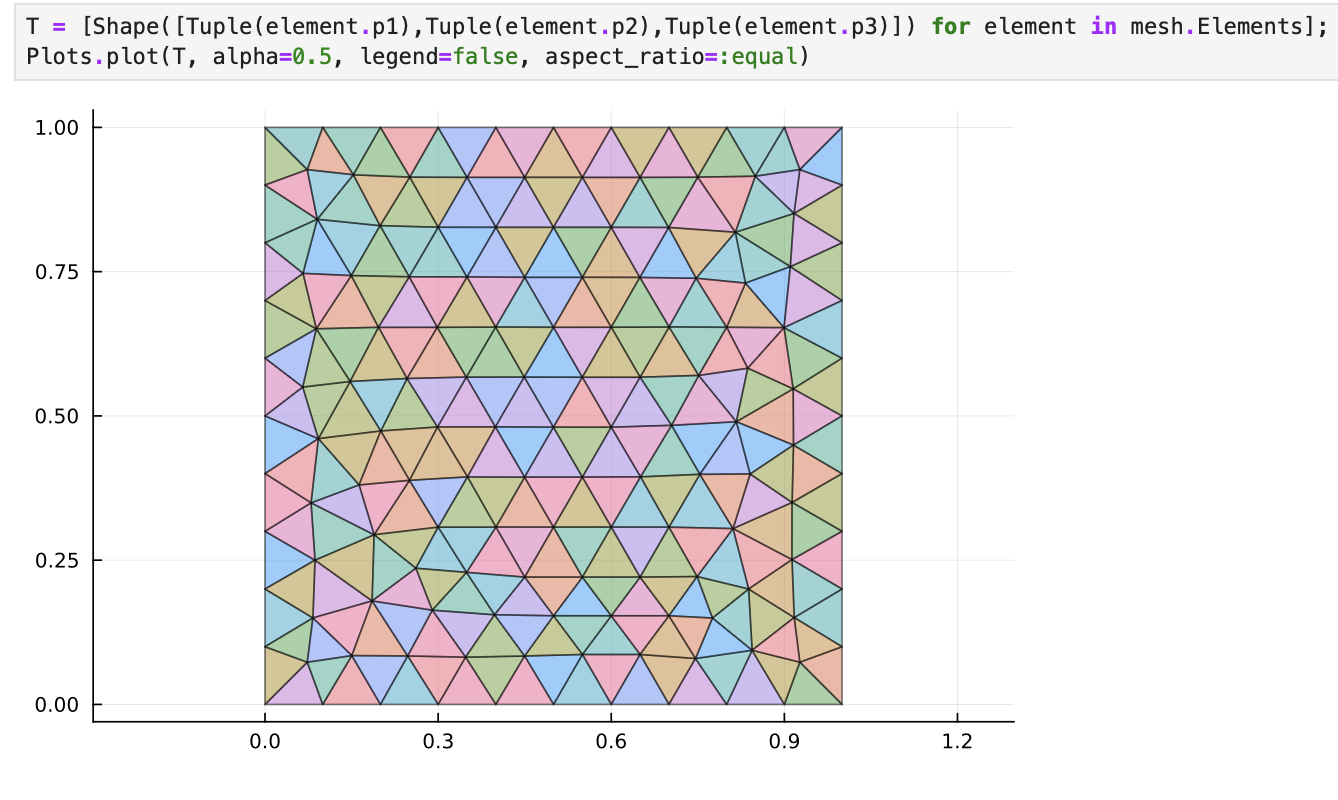
I agree with @sgaure that type stability is not the bottleneck here. I’d try to make a vector of shapes and then call `plot()` just once. MWE:
```Julia
julia> T = [Shape(rand(3), rand(3)) for i in 1:1000]
julia> plot(T, alpha=0.5, legend=false, aspect_ratio=:equal)
```
I don’t know how many triangles you’re gonna plot but this is pretty fast with the default GR backend:

It takes less than a second to render and display the plot.
---
### Author:  [@ziolai](https://discourse.julialang.org/u/ziolai)
#### Post date: [August 6, 2025, 1:23pm UTC](https://discourse.julialang.org/t/type-stable-function-to-return-plots-plot/131359/8 "2025-08-06T13:23:19Z")
Correct! Many thanks! Great!
Assume next that each triangle has a value associated to it. How do I take this value into account in the plot?
Kind wishes, Domenico.
---
### Author:  [@piechologist](https://discourse.julialang.org/u/piechologist)
#### Post date: [August 6, 2025, 1:51pm UTC](https://discourse.julialang.org/t/type-stable-function-to-return-plots-plot/131359/9 "2025-08-06T13:51:05Z")
You can pass plot attributes as 1×n matrices. Let’s plot three triangles with different colors:
```Julia
plot(T[1:3], alpha=0.5, color=[:blue :green :red], legend=false)
```
Just extract the colors from `mesh` as you did with the coordinates. Note that `plot` requires a 1×n matrix, not a vector (see [here](https://docs.juliaplots.org/latest/tutorial/#Plot-Attributes)).
---
### Author:  [@ziolai](https://discourse.julialang.org/u/ziolai)
#### Post date: [August 6, 2025, 6:11pm UTC](https://discourse.julialang.org/t/type-stable-function-to-return-plots-plot/131359/10 "2025-08-06T18:11:25Z")
Thx! Requires more thought.