# Pluto won't start
**URL:** https://discourse.julialang.org/t/pluto-wont-start/132131
**Category:** Pluto
**Created:** [September 6, 2025, 5:39am UTC](https://discourse.julialang.org/t/pluto-wont-start/132131 "2025-09-06T05:39:27Z")
**Posts on this page:** 7
**Page:** 1
### Author:  [@apchar](https://discourse.julialang.org/u/apchar)
#### Post date: [September 6, 2025, 5:39am UTC](https://discourse.julialang.org/t/pluto-wont-start/132131/1 "2025-09-06T05:39:27Z")
I’m new. Just installed Julia 1.11.6 a few days ago. When I try to start pluto I get a methoderror exception. Ideas?? Kinda discouraging when the recommended platform wont even start.
julia\> using Pluto
julia\> Pluto.run()
Opening localhost:1234/?secret=EA12hIM in your default browser… ~ have fun!
Press Ctrl+C in this terminal to stop Pluto
┌ Error:
│ exception =
│ MethodError: Cannot `convert` an object of type
│ SubArray{UInt8,1,Memory{UInt8},Tuple{UnitRange{Int64}},true} to an object of type
│ SubArray{UInt8,1,Vector{UInt8},Tuple{UnitRange{Int64}},true}
│ The function `convert` exists, but no method is defined for this combination of argument types.
│
│ Closest candidates are:
│ SubArray{T, N, P, I, L}(::Any, ::Any, ::Any, ::Any) where {T, N, P, I, L}
│ @ Base subarray.jl:19
│ convert(::Type{T}, ::T) where T
│ @ Base Base.jl:126
│ convert(::Type{T}, ::T) where T\<:AbstractArray
│ @ Base abstractarray.jl:16
│ …
│
│ Stacktrace:
│ [1] readuntil(buf::IOBuffer, find\_delimiter::typeof(HTTP.Parsers.find\_end\_of\_header))
│ @ HTTP.IOExtras C:\Users\apchar.julia\packages\HTTP\aTjcj\src\IOExtras.jl:139
│ [2] readuntil(t::HTTP.ConnectionPool.Transaction{Sockets.TCPSocket}, f::Function, sizehint::Int64)
│ @ HTTP.ConnectionPool C:\Users\apchar.julia\packages\HTTP\aTjcj\src\ConnectionPool.jl:296
│ [3] readuntil(t::HTTP.ConnectionPool.Transaction{Sockets.TCPSocket}, f::Function)
and so on.
---
### Author:  [@gdalle](https://discourse.julialang.org/u/gdalle)
#### Post date: [September 6, 2025, 6:11am UTC](https://discourse.julialang.org/t/pluto-wont-start/132131/2 "2025-09-06T06:11:25Z")
Hi, and welcome to the community!
This looks like a situation where you initially installed Pluto in a Julia 1.10 environment but then upgraded the language to 1.11 without re-resolving the packages. What is the output of `Pkg.status()`? Does running `Pkg.resolve()` make things better?
---
### Author:  [@apchar](https://discourse.julialang.org/u/apchar)
#### Post date: [September 7, 2025, 2:03am UTC](https://discourse.julialang.org/t/pluto-wont-start/132131/3 "2025-09-07T02:03:05Z")
Thank you for the help. I tried as you suggested:
julia\> Pkg.status()
Status `C:\Users\apchar\.julia\environments\v1.11\Project.toml`
[0e736298] Bessels v0.2.8
[5ae59095] Colors v0.13.1
[7876af07] Example v0.5.5
[7a1cc6ca] FFTW v1.9.0
[e48b7b93] FundamentalsNumericalComputation v0.4.5
[4b11ee91] Gaston v2.0.0
[4df31cd9] Grassmann v0.8.42
[7073ff75] IJulia v1.30.3
[d0351b0e] InspectDR v0.4.6
[b964fa9f] LaTeXStrings v1.4.0
[3db4a2ba] LegendrePolynomials v0.4.5
[58dd65bb] Plotly v0.4.1
[91a5bcdd] Plots v1.40.19
⌃ [c3e4b0f8] Pluto v0.14.2
[27ebfcd6] Primes v0.5.7
[d330b81b] PyPlot v2.11.6
[0c5d862f] Symbolics v6.54.0
[b8865327] UnicodePlots v3.8.1
Info Packages marked with ⌃ have new versions available and may be upgradable.
julia\> Pkg.resolve()
No Changes to `C:\Users\apchar\.julia\environments\v1.11\Project.toml`
No Changes to `C:\Users\apchar\.julia\environments\v1.11\Manifest.toml`
(@v1.11) pkg\> update Pluto
Updating registry at `C:\Users\apchar\.julia\registries\General.toml`
No Changes to `C:\Users\apchar\.julia\environments\v1.11\Project.toml`
No Changes to `C:\Users\apchar\.julia\environments\v1.11\Manifest.toml`
julia\> Pkg.status()
Status `C:\Users\apchar\.julia\environments\v1.11\Project.toml`
[0e736298] Bessels v0.2.8
[5ae59095] Colors v0.13.1
[7876af07] Example v0.5.5
[7a1cc6ca] FFTW v1.9.0
[e48b7b93] FundamentalsNumericalComputation v0.4.5
[4b11ee91] Gaston v2.0.0
[4df31cd9] Grassmann v0.8.42
[7073ff75] IJulia v1.30.3
[d0351b0e] InspectDR v0.4.6
[b964fa9f] LaTeXStrings v1.4.0
[3db4a2ba] LegendrePolynomials v0.4.5
[58dd65bb] Plotly v0.4.1
[91a5bcdd] Plots v1.40.19
⌃ [c3e4b0f8] Pluto v0.14.2
[27ebfcd6] Primes v0.5.7
[d330b81b] PyPlot v2.11.6
[0c5d862f] Symbolics v6.54.0
[b8865327] UnicodePlots v3.8.1
Info Packages marked with ⌃ have new versions available and may be upgradable.
How to I force an update to Pluto ?
---
### Author:  [@nilshg](https://discourse.julialang.org/u/nilshg)
#### Post date: [September 7, 2025, 6:25am UTC](https://discourse.julialang.org/t/pluto-wont-start/132131/4 "2025-09-07T06:25:21Z")
`] add Pluto@0.20`
---
### Author:  [@cormullion](https://discourse.julialang.org/u/cormullion)
#### Post date: [September 7, 2025, 12:13pm UTC](https://discourse.julialang.org/t/pluto-wont-start/132131/5 "2025-09-07T12:13:01Z")
I see this result with the OPs setup:
```juliaterm
(@Temp) pkg> add Pluto@v0.20
Resolving package versions...
ERROR: Unsatisfiable requirements detected for package HTTP [cd3eb016]:
HTTP [cd3eb016] log:
├─possible versions are: 0.6.10 - 1.10.17 or uninstalled
├─restricted by compatibility requirements with Plotly [58dd65bb] to versions: 0.6.10 - 0.9.17
│ └─Plotly [58dd65bb] log:
│ ├─possible versions are: 0.2.0 - 0.4.1 or uninstalled
│ └─restricted to versions * by project [864e6c0d], leaving only versions: 0.2.0 - 0.4.1
│ └─project [864e6c0d] log:
│ ├─possible 🤔 are: 0.0.0 or uninstalled
│ └─project [864e6c0d] is fixed to version 0.0.0
└─restricted by compatibility requirements with Pluto [c3e4b0f8] to versions: 1.5.2 - 1.10.17 — no versions left
└─Pluto [c3e4b0f8] log:
├─possible versions are: 0.2.0 - 0.20.17 or uninstalled
├─restricted to versions * by project [864e6c0d], leaving only versions: 0.2.0 - 0.20.17
│ └─project [864e6c0d] log: see above
└─restricted to versions 0.20 by an explicit requirement, leaving only versions: 0.20.0 - 0.20.17
```
I’m suspicious of Plotly… 🤔 If I remove Plotly, Pluto runs.
I’d recommend getting Pluto to run in a new project before adding every plotting package. 🙂
---
### Author:  [@Benny](https://discourse.julialang.org/u/Benny)
#### Post date: [September 7, 2025, 4:00pm UTC](https://discourse.julialang.org/t/pluto-wont-start/132131/6 "2025-09-07T16:00:40Z")
> [@cormullion](#):
>
> I’m suspicious of Plotly… 🤔 If I remove Plotly, Pluto runs
For once, the error message is clear enough. All versions of Plotly.jl restrict HTTP.jl to v0, all versions of Pluto.jl restricts HTTP.jl to v1. That’s in large part due to Plotly.jl being an abandoned package that last released in 2018 (though it has a few commits since) and Pluto.jl starting releases in 2020. It’s generally difficult for packages whose development lifetimes don’t overlap much to be compatible, and these 2 packages don’t overlap at all. I honestly don’t know why Plotly.jl hasn’t had an update because it and the active PlotlyJS.jl still cross-reference each other and point out that `Plotly` has cloud features.
---
### Author:  [@VivMendes](https://discourse.julialang.org/u/VivMendes)
#### Post date: [September 7, 2025, 6:05pm UTC](https://discourse.julialang.org/t/pluto-wont-start/132131/7 "2025-09-07T18:05:07Z")
As mentioned, Plotly.jl has been in a state of abandonment for a long time now.
If you want to use the plotting capabilities of Plotly in a Pluto notebook, from my own experience, you have two main possibilities: using PlotlyJS.jl, or PlutoPlotly.jl.
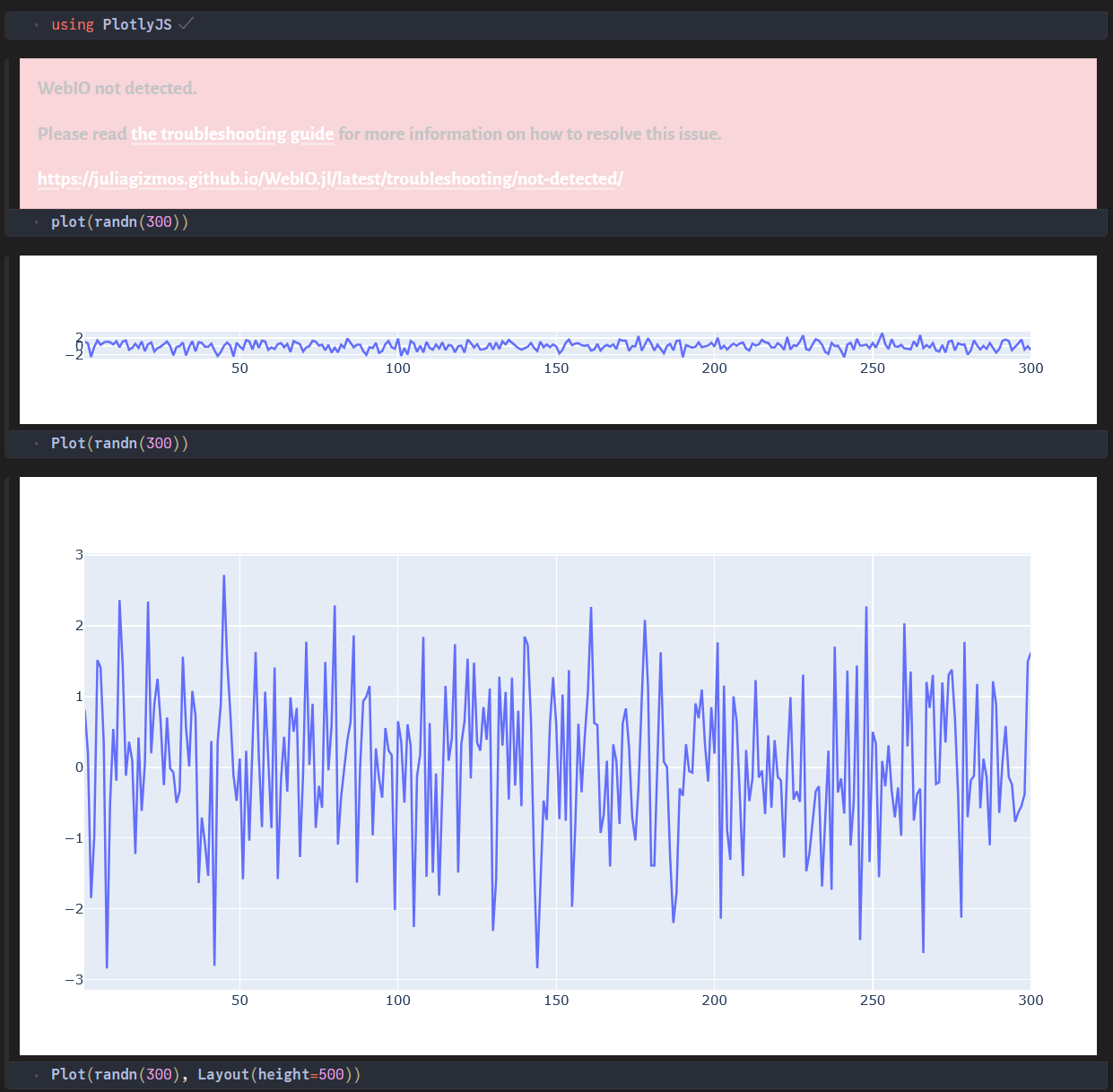
If you want to stick to PlotlyJS.jl, there are some tweaks that you should take into account. The original `plot` function, will become `Plot`, otherwise, you will get the the old error “WebIO not detected”. See an image attached for an example. Furthermore, you have to specify the `height` of the plot you want to see in the notebook (otherwise, you will get a stretched view of your plot, see image for an example). Untill now, with some small contributions of yours, you will get Plotly plotting working well in a Pluto notebook. However, there is one problem that I do not think you can overcome: if you want to produce an HTML version of your notebook, all the plots will become unusable because they will inserted in a much smaller scrollable plot pane.
On the other hand, if you choose PlutoPlotly.jl, you get rid off all the problems above and still get all the Plotly plotting capabilities in your notebook, with some extras added by its developer (@disberd).
Now. with the image: