# Plotting in the VSCode secondary side bar
**URL:** https://discourse.julialang.org/t/plotting-in-the-vscode-secondary-side-bar/131524
**Category:** VS Code
**Tags:** plotting
**Created:** [August 11, 2025, 7:58am UTC](https://discourse.julialang.org/t/plotting-in-the-vscode-secondary-side-bar/131524 "2025-08-11T07:58:37Z")
**Posts on this page:** 6
**Page:** 1
### Author:  [@owiecc](https://discourse.julialang.org/u/owiecc)
#### Post date: [August 11, 2025, 7:58am UTC](https://discourse.julialang.org/t/plotting-in-the-vscode-secondary-side-bar/131524/1 "2025-08-11T07:58:37Z")
Is it possible to put plots by default in the secondary side bar of VSCode? Ideally also have the side bar split vertically:
```julia-auto
┌──────────────┳━━━━━━━┓
│ ┃ ┃
│ ┃ Plots ┃
│ ┃ ┃
│ ┣───────┫
│ ┃Console┃
│ ┃ ┃
│ ┃ ┃
│ ┃ ┃
│ ┃ ┃
└──────────────┻━━━━━━━┛
```
---
### Author:  [@karei](https://discourse.julialang.org/u/karei)
#### Post date: [August 11, 2025, 11:31am UTC](https://discourse.julialang.org/t/plotting-in-the-vscode-secondary-side-bar/131524/2 "2025-08-11T11:31:56Z")
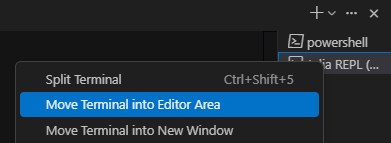
This method does not guarantee that this state will be maintained by _default_ every time you start up, but it can temporarily meet your needs. First, move the terminal to the editor area, then close the right sidebar. Drag the terminal in the editor area to the right, then drag the plots tab to the right to achieve a split screen on the right side.
Restarting VSCode will restore this state. 🥲
---
### Author:  [@owiecc](https://discourse.julialang.org/u/owiecc)
#### Post date: [August 11, 2025, 12:34pm UTC](https://discourse.julialang.org/t/plotting-in-the-vscode-secondary-side-bar/131524/3 "2025-08-11T12:34:57Z")
It is a bit weird but it works. Thank you!
---
### Author:  [@marius311](https://discourse.julialang.org/u/marius311)
#### Post date: [August 14, 2025, 6:45am UTC](https://discourse.julialang.org/t/plotting-in-the-vscode-secondary-side-bar/131524/4 "2025-08-14T06:45:48Z")
This is a quicker way to achieve that I think. Note if you have multiple terminals, you’ll instead click on the one you want in the list of terminals. I think if you click “lock group” it stays there on restart, not sure.
---
### Author:  [@owiecc](https://discourse.julialang.org/u/owiecc)
#### Post date: [August 14, 2025, 7:32pm UTC](https://discourse.julialang.org/t/plotting-in-the-vscode-secondary-side-bar/131524/5 "2025-08-14T19:32:14Z")
I just tested that. If you lock the plots pane and the shell they will stay put even after the reset.
When you start Julia REPL afterwards it will always open in the secondary side panel so you still need to move it to the correct position and close the secondary side bar.
---
### Author:  [@jules](https://discourse.julialang.org/u/jules)
#### Post date: [August 18, 2025, 9:06am UTC](https://discourse.julialang.org/t/plotting-in-the-vscode-secondary-side-bar/131524/6 "2025-08-18T09:06:15Z")
I made a special restart repl command that also applies my desired layout because it was so annoying to always drag things into the correct position again:
```julia-auto
{
"key": "ctrl+shift+j",
"command": "runCommands",
"args": {
"commands": [
"language-julia.restartREPL",
"workbench.action.editorLayoutTwoRowsRight",
"workbench.action.moveEditorToLastGroup",
]
},
},
```