# Pkg Manager Issues due to VPN/Windows 11?
**URL:** https://discourse.julialang.org/t/pkg-manager-issues-due-to-vpn-windows-11/131633
**Category:** General Usage
**Created:** [August 15, 2025, 5:18pm UTC](https://discourse.julialang.org/t/pkg-manager-issues-due-to-vpn-windows-11/131633 "2025-08-15T17:18:17Z")
**Posts on this page:** 10
**Page:** 1
### Author:  [@co1emi11er](https://discourse.julialang.org/u/co1emi11er)
#### Post date: [August 15, 2025, 5:18pm UTC](https://discourse.julialang.org/t/pkg-manager-issues-due-to-vpn-windows-11/131633/1 "2025-08-15T17:18:17Z")
I use julia on a work computer and I don’t recall this being an issue in the past.
Anytime I try to install or update packages, it pops up a message that looks something like this:
```julia-repl
(@v1.11) pkg> registry up General
Updating registry at `C:\Users\cmiller\.julia\registries\General`
┌ Info: The General registry is installed via git. Consider reinstalling it via
│ the newer faster direct from tarball format by running:
│ pkg> registry rm General; registry add General
└
```
It ends up still working, but it goes through git rather than the normal way. It takes much longer, and colleagues that don’t have git aren’t able to install anything (I only tried with one colleague and pkgs weren’t installing. I assume it was because he doesn’t have git).
I submitted an issue to IT, because I assume its due to SSL certification. Running this produces the following error:
```cmd
> curl -L https://pkg.julialang.org/registries
curl: (35) schannel: next InitializeSecurityContext failed: CRYPT_E_NO_REVOCATION_CHECK (0x80092012) - The revocation function was unable to check revocation for the certificate.
```
IT responded with:
This issue also comes up with installing packages through pip in Python and with R. Instead of changing a network policy to allow access to the CRL/OSCP, there is usually a workaround to ignore SSL verification when installing packages. I know with Python/pip this is done using the “–trusted-host” flag at the end of an install command. Do you know if Julia has something similar?
Note that this should only be used for packages and sources that you know you can trust.
Does julia have an option like this?
---
### Author:  [@GunnarFarneback](https://discourse.julialang.org/u/GunnarFarneback)
#### Post date: [August 15, 2025, 5:28pm UTC](https://discourse.julialang.org/t/pkg-manager-issues-due-to-vpn-windows-11/131633/2 "2025-08-15T17:28:11Z")
See [Network Options · The Julia Language](https://docs.julialang.org/en/v1/stdlib/NetworkOptions/#NetworkOptions.verify_host).
---
### Author:  [@co1emi11er](https://discourse.julialang.org/u/co1emi11er)
#### Post date: [August 15, 2025, 5:34pm UTC](https://discourse.julialang.org/t/pkg-manager-issues-due-to-vpn-windows-11/131633/3 "2025-08-15T17:34:51Z")
I had looked into network options but I was not really following how to use it. I imagine I would add something to my startup.jl file?
---
### Author:  [@jdad](https://discourse.julialang.org/u/jdad)
#### Post date: [August 15, 2025, 5:48pm UTC](https://discourse.julialang.org/t/pkg-manager-issues-due-to-vpn-windows-11/131633/4 "2025-08-15T17:48:14Z")
I think it refer to putting
```julia-auto
export JULIA_NO_VERIFY_HOSTS='**'
```
in your (`.bash_profile` or, rather, ) `.bashrc`
( _not_ in your `startup.jl`)
HTH,
---
### Author:  [@co1emi11er](https://discourse.julialang.org/u/co1emi11er)
#### Post date: [August 15, 2025, 5:53pm UTC](https://discourse.julialang.org/t/pkg-manager-issues-due-to-vpn-windows-11/131633/5 "2025-08-15T17:53:46Z")
So if I did this on Windows:
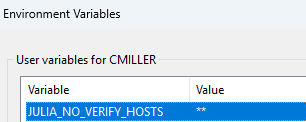
Is that equivalent to the `.bash_profile`
I still get an error (but maybe it is different now?):
```julia-repl
(@v1.11) pkg> registry up General
┌ Warning: could not download https://pkg.julialang.org/registries
│ exception = RequestError: Failure when receiving data from the peer while requesting https://pkg.julialang.org/registries
└ @ Pkg.Registry C:\Users\cmiller\.julia\juliaup\julia-1.11.6+0.x64.w64.mingw32\share\julia\stdlib\v1.11\Pkg\src\Registry\Registry.jl:77
Updating registry at `C:\Users\cmiller\.julia\registries\General`
┌ Info: The General registry is installed via git. Consider reinstalling it via
│ the newer faster direct from tarball format by running:
│ pkg> registry rm General; registry add General
└
Updating git-repo `https://github.com/JuliaRegistries/General.git`
```
---
### Author:  [@jdad](https://discourse.julialang.org/u/jdad)
#### Post date: [August 15, 2025, 6:12pm UTC](https://discourse.julialang.org/t/pkg-manager-issues-due-to-vpn-windows-11/131633/6 "2025-08-15T18:12:33Z")
My bad : I reacted to the `network issue` statement, and did give you the trick to walk around SSL certificates trouble.
Here your issue is that you have the `git`-cloned version of the `General registry` installed. The message suggests you to go to the `tar`- based one, which is much,much faster on Windows (and also faster in Linux).
In order to do so you must uninstall the prior (git-based) version of General, and then install a fresh version of it, which will be tar-based.
So it means that you have to go through the following steps (don’t type shell’s `user@host:` or julia’s `julia>` or `pkg>` prompts)
```julia-auto
user@host: julia -q
julia>]
pkg>registry rm General
pkg>registry add General
# now you can update you project
pkg>up
```
HTH,
---
### Author:  [@co1emi11er](https://discourse.julialang.org/u/co1emi11er)
#### Post date: [August 15, 2025, 6:19pm UTC](https://discourse.julialang.org/t/pkg-manager-issues-due-to-vpn-windows-11/131633/7 "2025-08-15T18:19:27Z")
Unfortunately it is still not working:
```julia-repl
(@v1.11) pkg> registry rm General
Removing registry `General` from C:\Users\cmiller\.julia\registries\General
(@v1.11) pkg> registry add General
┌ Warning: could not download https://pkg.julialang.org/registries
│ exception = RequestError: Failure when receiving data from the peer while requesting https://pkg.julialang.org/registries
└ @ Pkg.Registry C:\Users\cmiller\.julia\juliaup\julia-1.11.6+0.x64.w64.mingw32\share\julia\stdlib\v1.11\Pkg\src\Registry\Registry.jl:77
Cloning registry from "https://github.com/JuliaRegistries/General.git"
Added registry `General` to `C:\Users\cmiller\.julia\registries\General`
```
---
### Author:  [@jdad](https://discourse.julialang.org/u/jdad)
#### Post date: [August 15, 2025, 6:32pm UTC](https://discourse.julialang.org/t/pkg-manager-issues-due-to-vpn-windows-11/131633/8 "2025-08-15T18:32:17Z")
Possibly it is a network failure beacause of a (corporate?) firewall. Here it seems Julia could not reach `pkg.julialang.org` (or at least communication was shut done during transfer).
May be a Julia system administrator could help you to do a further debugging, or you could discuss it with own IT administrator.
For the record, at [https://julialang.org/install/](https://julialang.org/install/) the `Domains` item says :
### [Official domains](https://julialang.org/install/#official_domains)
The following domains are official and used by open source Julia infrastructure for serving content and resources:
- `julialang.org` and all subdomains
- `julialang.net` and all subdomains
If you are using Julia behind a firewall that blocks access to these, you may have trouble downloading and installing Julia packages. If this is the case, please ask your sysadmin to add these domains to the firewall allow list. Traffic can be limited to HTTPS (TCP port 443).
---
### Author:  [@magister-ludi](https://discourse.julialang.org/u/magister-ludi)
#### Post date: [August 16, 2025, 1:38pm UTC](https://discourse.julialang.org/t/pkg-manager-issues-due-to-vpn-windows-11/131633/9 "2025-08-16T13:38:01Z")
I had the same problem a while ago. My solution is here:
> [@How do I convert to using the package tarball format?](https://discourse.julialang.org/t/how-do-i-convert-to-using-the-package-tarball-format/126100/6):
>
> I have checked the source of Pkg.jl. There are two places in the code where the @info message could be emitted. Both of them check whether the registry name is "General" (obviously true in my case), and whether ENV has the key "JULIA\_PKG\_GEN\_REG\_FMT\_CHECK", defaulting to true if it doesn’t. Since that key doesn’t exist in my environment, both tests pass and the message is emitted. I don’t know when the variable for the second test could/should have been set, but I have now added ENV["JULIA\_PKG…
---
### Author:  [@co1emi11er](https://discourse.julialang.org/u/co1emi11er)
#### Post date: [August 21, 2025, 4:06pm UTC](https://discourse.julialang.org/t/pkg-manager-issues-due-to-vpn-windows-11/131633/10 "2025-08-21T16:06:10Z")
I have confirmed that switching juliaup to default to lts, and then using julia 1.10, I am able to download the registry without any extra variables like: `export JULIA_NO_VERIFY_HOSTS='**'`
This seems to be a new issue on 1.11