# Makie, how to move \`xlabel\` to the right?
**URL:** https://discourse.julialang.org/t/makie-how-to-move-xlabel-to-the-right/93793
**Category:** General Usage
**Tags:** makie
**Created:** [January 30, 2023, 9:03pm UTC](https://discourse.julialang.org/t/makie-how-to-move-xlabel-to-the-right/93793 "2023-01-30T21:03:21Z")
**Posts on this page:** 11
**Page:** 1
### Author:  [@jling](https://discourse.julialang.org/u/jling)
#### Post date: [January 30, 2023, 9:03pm UTC](https://discourse.julialang.org/t/makie-how-to-move-xlabel-to-the-right/93793/1 "2023-01-30T21:03:21Z")
For example: 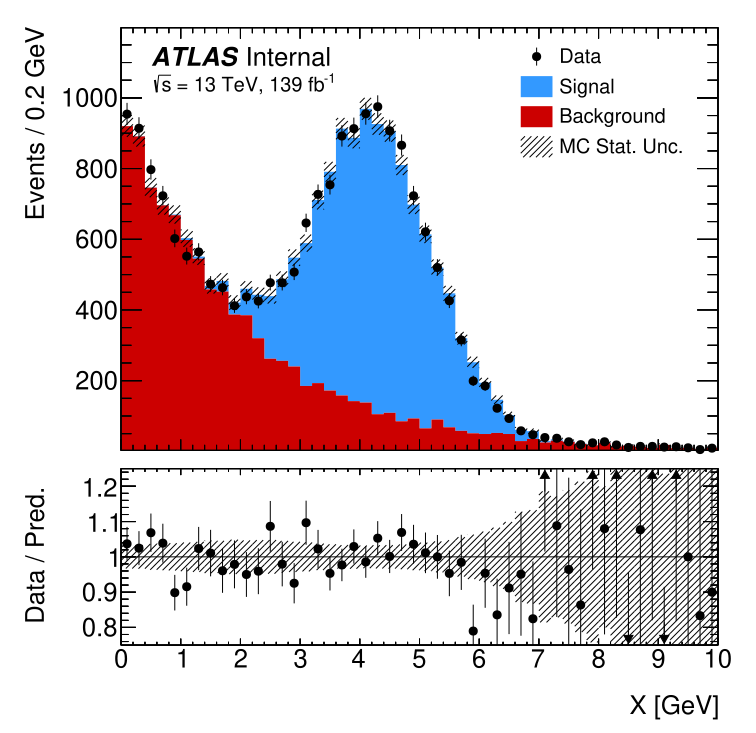
the `X [GeV]`
---
### Author:  [@mkoculak](https://discourse.julialang.org/u/mkoculak)
#### Post date: [January 31, 2023, 1:06am UTC](https://discourse.julialang.org/t/makie-how-to-move-xlabel-to-the-right/93793/2 "2023-01-31T01:06:33Z")
So this is a really ugly solution, but hey, it works.
```julia
using GLMakie
f = scatter(rand(100), rand(100))
f.axis.xlabel = "x"
# Originally it was [416.0, 33.36] and this below moved it to the left
f.axis.xaxis.elements[:labeltext].input_args[1][] = [306.0, 33.36]
```
I would assume there is a specialized function, but with Makie I find it easier to just roam around the objects until I find a plausible Observable. 😉
---
### Author:  [@jling](https://discourse.julialang.org/u/jling)
#### Post date: [January 31, 2023, 1:36am UTC](https://discourse.julialang.org/t/makie-how-to-move-xlabel-to-the-right/93793/4 "2023-01-31T01:36:33Z")
> [@mkoculak](#):
>
> `[306.0, 33.36]`
just like many things, these numbers are absolute coordinates (data dependent) ☹
---
### Author:  [@mkoculak](https://discourse.julialang.org/u/mkoculak)
#### Post date: [January 31, 2023, 1:39am UTC](https://discourse.julialang.org/t/makie-how-to-move-xlabel-to-the-right/93793/5 "2023-01-31T01:39:54Z")
Are you sure they are not pixels? So you should know in advance where to put it (you could script is as a fraction of explicitly declared resolution).
---
### Author:  [@jling](https://discourse.julialang.org/u/jling)
#### Post date: [January 31, 2023, 1:45am UTC](https://discourse.julialang.org/t/makie-how-to-move-xlabel-to-the-right/93793/6 "2023-01-31T01:45:21Z")
even if they are pixels, how’d I know in advance, no matter, I mean it’s not a friendly solution at any rate.
---
### Author:  [@mkoculak](https://discourse.julialang.org/u/mkoculak)
#### Post date: [January 31, 2023, 2:24am UTC](https://discourse.julialang.org/t/makie-how-to-move-xlabel-to-the-right/93793/7 "2023-01-31T02:24:58Z")
Ok, fine. Let’s cook up a nicer one.
Try this:
```julia
function move_xlabel!(axis)
ax_lend = axis.xaxis.elements[:axisline][1].val[1][1]
ax_rend = axis.xaxis.elements[:axisline][1].val[2][1]
label_pos = axis.xaxis.elements[:labeltext][1].val[1][1]
translate!(axis.xaxis.elements[:labeltext], ax_rend-label_pos, 0, 0)
axis.xaxis.elements[:labeltext].attributes[:align][] = (:right, :top)
end
```
And then just:
```julia
using GLMakie
fig, axis, plot = scatter(rand(100), rand(100))
axis.xlabel = "This is on the right!"
move_xlabel!(axis)
```
For me it aligns the right edge of the xlabel to the end of x-axis.
Also, making the function more generic should provide a tool to move both labels to any corner.
You can also add an offset parameter in the subtraction in `translate!` to move it a bit off axis, if needed.
---
### Author:  [@asinghvi17](https://discourse.julialang.org/u/asinghvi17)
#### Post date: [January 31, 2023, 6:07am UTC](https://discourse.julialang.org/t/makie-how-to-move-xlabel-to-the-right/93793/8 "2023-01-31T06:07:29Z")
Looks pretty cool! I whipped up a quick and dirty dynamic version, which should be able to translate the axis xlabel to any halign, even outside (0,1), and keep abreast of changing layouts.
```julia
function move_xlabel!(axis, halign = 1.0)
0 <= halign <= 1 || @warn "Halign outside of (0, 1)! Be warned."
label_pos = @lift $(axis.xaxis.elements[:labeltext][1])[1][1] # get the label position in the x dimension
lift(axis.scene.px_area, label_pos) do px_area, current_pos
xwidth = px_area.widths[1] # the width of the scene
desired_offset = xwidth * halign
translate!(axis.xaxis.elements[:labeltext], desired_offset - current_pos, 0, 0)
end
# TODO: don't set this, let the user do it.
axis.xaxis.elements[:labeltext].align[] = (:right, :top)
end
```
Executing this code,
```julia
f, a, p = lines(rand(10))
a.xlabel = "Hello there!"
move_xlabel!(a, 0.9)
```
I get this output:

which seems pretty good! One could theoretically implement something similar for the y-label as well.
---
### Author:  [@ffreyer](https://discourse.julialang.org/u/ffreyer)
#### Post date: [January 31, 2023, 10:50am UTC](https://discourse.julialang.org/t/makie-how-to-move-xlabel-to-the-right/93793/9 "2023-01-31T10:50:53Z")
You could also just throw a separate `Label` below. E.g. `Label(f[2, 1], "Test ", halign = :right, tellwidth = false)`. (You can also set halign to a fraction like 0.8)
---
### Author:  [@jules](https://discourse.julialang.org/u/jules)
#### Post date: [February 2, 2023, 10:17am UTC](https://discourse.julialang.org/t/makie-how-to-move-xlabel-to-the-right/93793/10 "2023-02-02T10:17:04Z")
Someone could make a PR to Makie which allows alignment to be set on the `LineAxis` label, `:top` and `:bottom` or number for y and `:right`, `:left` or number for x orientation. That should not be more difficult than coming up with hacks 🙂
---
### Author:  [@e3c6](https://discourse.julialang.org/u/e3c6)
#### Post date: [March 24, 2024, 4:29pm UTC](https://discourse.julialang.org/t/makie-how-to-move-xlabel-to-the-right/93793/11 "2024-03-24T16:29:20Z")
Sorry to revive an old topic, but I wonder if there was any update on Makie that made this axis label placement easier? Or is the hack above still the only way to do this? Thanks!
---
### Author:  [@jules](https://discourse.julialang.org/u/jules)
#### Post date: [March 24, 2024, 5:17pm UTC](https://discourse.julialang.org/t/makie-how-to-move-xlabel-to-the-right/93793/12 "2024-03-24T17:17:00Z")
> [@jules](#):
>
> Someone could make a PR to Makie
Nobody did, the easiest way is still to use `Label`