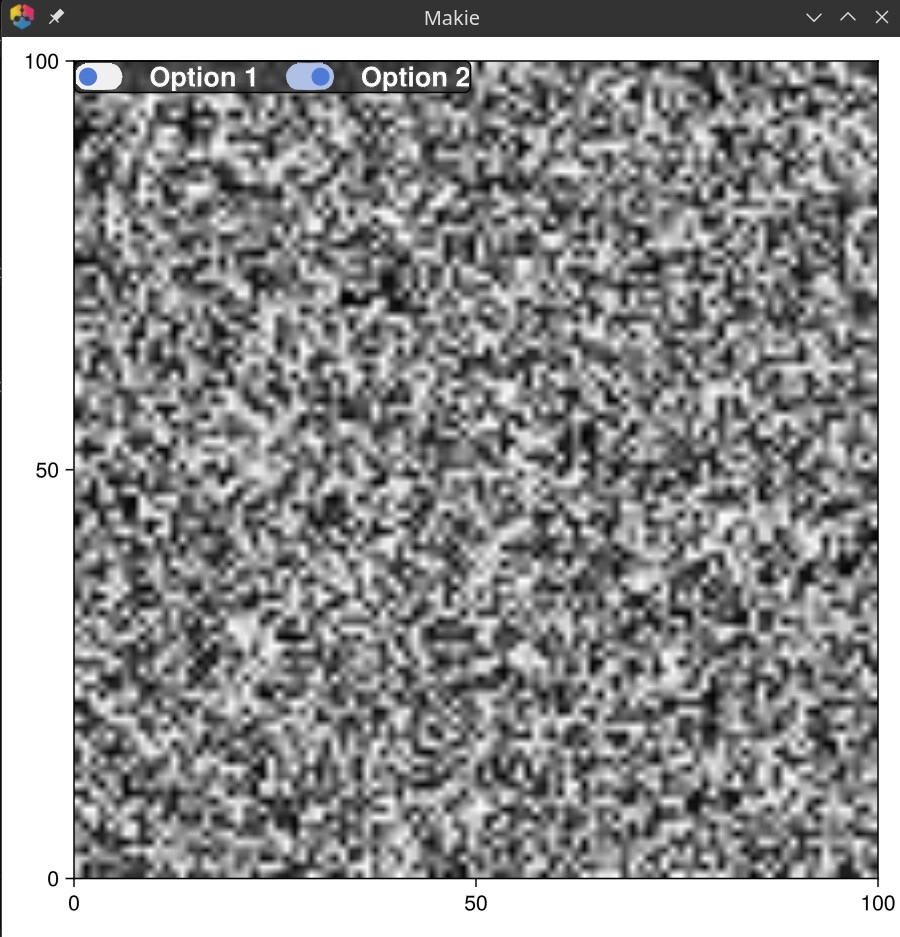
# In GLMakie how to place two checkboxes overlaid on an image
**URL:** https://discourse.julialang.org/t/in-glmakie-how-to-place-two-checkboxes-overlaid-on-an-image/132961
**Category:** Visualization
**Tags:** makie, gui, glmakie
**Created:** [October 7, 2025, 10:10pm UTC](https://discourse.julialang.org/t/in-glmakie-how-to-place-two-checkboxes-overlaid-on-an-image/132961 "2025-10-07T22:10:56Z")
**Posts on this page:** 2
**Page:** 1
### Author:  [@lgmendesAibili](https://discourse.julialang.org/u/lgmendesAibili)
#### Post date: [October 7, 2025, 10:10pm UTC](https://discourse.julialang.org/t/in-glmakie-how-to-place-two-checkboxes-overlaid-on-an-image/132961/1 "2025-10-07T22:10:56Z")
It is possible to place two checkboxes overlaid on an image using GLMakie?
---
### Author:  [@sdanisch](https://discourse.julialang.org/u/sdanisch)
#### Post date: [October 8, 2025, 1:27pm UTC](https://discourse.julialang.org/t/in-glmakie-how-to-place-two-checkboxes-overlaid-on-an-image/132961/2 "2025-10-08T13:27:59Z")
Yes:
```julia
using GLMakie
# Create a figure with an image
fig = Figure(size=(600, 600))
ax = Axis(fig[1, 1])
# Display an image (you can use your own image)
test_img = rand(100, 100)
image!(ax, test_img)
# Create a single layout with both checkboxes side by side
gl = GridLayout(fig[1, 1], tellwidth=false, tellheight=false,
halign=:left, valign=:top)
# Add background box
box = Box(gl[1, 1:4], color=RGBAf(0.2, 0.2, 0.2, 0.8), cornerradius=4)
# Add padding around the content
rowgap!(gl, 20)
# colgap!(gl, 20)
# First checkbox
toggle1 = Toggle(gl[1, 1], active=false)
label1 = Label(gl[1, 2], "Option 1", halign=:left, font=:bold, fontsize=18, color=:white)
toggle2 = Toggle(gl[1, 3], active=true)
label2 = Label(gl[1, 4], "Option 2", halign=:left, font=:bold, fontsize=18, color=:white)
# React to toggle changes
on(toggle1.active) do state
println("Toggle 1 is now: ", state)
end
on(toggle2.active) do state
println("Toggle 2 is now: ", state)
end
display(fig)
```