# \[ANN\] Juno-Plus 0.10.2
**URL:** https://discourse.julialang.org/t/ann-juno-plus-0-10-2/32807
**Category:** Tooling
**Tags:** announcement, juno
**Created:** [December 30, 2019, 8:19pm UTC](https://discourse.julialang.org/t/ann-juno-plus-0-10-2/32807 "2019-12-30T20:19:46Z")
**Posts on this page:** 7
**Page:** 1
### Author:  [@Amin\_Yahyaabadi](https://discourse.julialang.org/u/Amin_Yahyaabadi)
#### Post date: [December 30, 2019, 8:19pm UTC](https://discourse.julialang.org/t/ann-juno-plus-0-10-2/32807/1 "2019-12-30T20:19:46Z")
**2020-Feb-17:**
Juno-Plus 0.10.2:
I released Juno-Plus 0.10.2 recently. Download it here: [Sunsetting Atom - The GitHub Blog](https://atom.io/packages/juno-plus)
Changelog:
- new button: Enable/Disable Juno
- new button: Debug: Run File
- new button: Debug: Step into File
- new button: Run the cell
- new button: Go to definition
- Combining fold buttons to a toggle folding button
- Adds options for enabling “Start Julia Process” Buttons (defaults to false)
- Adds options for enabling “Weave” Buttons (defaults to false)
This is how it looks like now:
## 
**2019-Dec-3:**
Juno-Plus 0.8:
I am happy to announce Juno-plus 0.8. This is an **Atom** ’s package that enhances Julia IDE (Juno) by adding some useful buttons and code snippets. Code snippets are also available for **VSCode** and **Sublime**.
**Changelog** :
- Adding Julia code snippets
There are some cool snippets among those. For example
`switch case`:

`do while`:
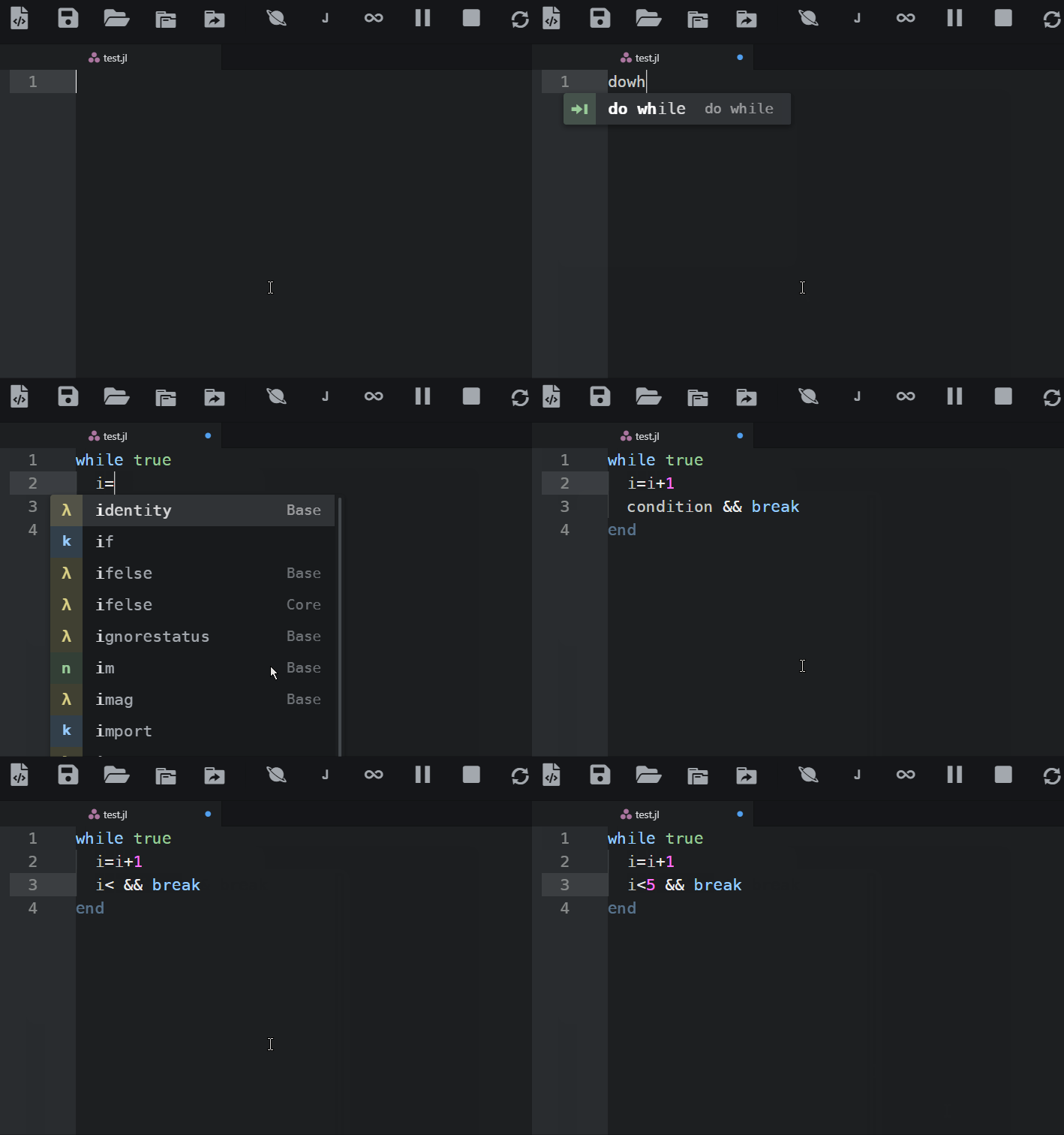
`!.`

- Adding Regex code snippets. This includes the Regex syntax and also some common snippets.
- Adding Weave code snippets.
- Adding more buttons. The full list is available in the following.

- I renamed Juno-Toolbar-Plus to Juno-Plus because I have added more features other than the toolbar.
### Atom Installation
> **[Sunsetting Atom](https://github.blog/news-insights/product-news/sunsetting-atom/)**
>
> We are archiving Atom and all projects under the Atom organization for an official sunset on December 15, 2022.
Repo: [GitHub - aminya/juno-plus: Enhances Juno - Julia IDE](https://github.com/aminya/juno-plus)
After installation, if the Julia Client icons are still present, you might need to reload/restart Atom 2 times! (because this package adjusts Julia Client and Tool-bar config settings).
## VSCode - Sublime Installation
Converted code snippets are available under `snippets_converted` folder.
## Buttons
### Files and Folders
- Open Folder - useful for opening and developing a project/package
- Select Julia working directory
### Process:
- Restart Julia (which removes workspace)
- Erase console
- Show documentation of selection
- using Revise
### Code Tools:
- Bookmarks
- Fold all - Unfold all: useful for code overview
- Auto Indent Selection (faster than Julia-Client formatting button)
### Viewers:
- Markdown preview: for previewing Readme.md if the package is already installed
### Atom utilities:
- Open Settings
- Fullscreen
- Command Palette
## Julia Snippets
To use snippets type the keyword `without space`.
### Basics and Arithmetic
| Snippet Description | Keyword |
| --- | --- |
| Swap | swap |
| Constant | const |
| !. | !. |
| null | null |
| nan | nan |
## Commenting
| Snippet Description | Keyword |
| --- | --- |
| Separator | sep |
| Comment Block | com |
## Strings and Characters
| Snippet Description | Keyword |
| --- | --- |
| Triple " | q3 |
| Character Code | char code |
| Character from Code | char from code |
| UTF character | utf |
| Loop through characters | for char |
| First matching string | findfirst string |
| Find and replace string | replace string |
## Types
| Snippet Description | Keyword |
| --- | --- |
| Int | int |
| UInt | uint |
| Float32 | single |
| Float64 | double |
| Parametric type | Type parametric |
| Union{} | Union |
| Union{Nothing,type} | UN |
| where | where |
| where multi | where multi |
| where \<: | where upper |
| UnionAll using where | UnionAll where |
| Parametric abstract type | abstract type parametric |
| typeof subtype | typeof subtype |
| typeof isa | typeof isa |
## Structs
| Snippet Description | Keyword |
| --- | --- |
| inherited Struct | struct inherited |
| Parametric Struct | struct parametric |
| Parametric inherited Struct | struct parametric inherited |
| Struct field names | struct field names |
| Struct field types | struct field types |
## Conditionals
| Snippet Description | Keyword |
| --- | --- |
| switch | switch case |
| if elseif | if elseif |
| try catch full | try catch full |
## Loops
| Snippet Description | Keyword |
| --- | --- |
| enumeration - index, value | for enumerate |
| nested loop - i,j | for nested |
| do while | do while |
| break | break |
| continue | continue |
| while with break | while break |
| for with break | for break |
| for with continue | for continue |
## Functions - Docstring
| Snippet Description | Keyword |
| --- | --- |
| Documented Function with Examples | function doc example |
| Function Full | function full |
| Docstring | doc |
| Docstring with Examples | doc example |
| Julia Example block | example |
## Dictionaries - Collections
| Snippet Description | Keyword |
| --- | --- |
| key =\> val pair | pair |
| Dict pair | Dict pair |
| Dict keys | Dict keys |
| Dict values | Dict values |
| Loop through key-value pairs | for Dict |
## Weave Snippets
| Snippet Description | Keyword |
| --- | --- |
| Hidden Output for Julia code chunk | out julia false |
| Non Echoed Julia code chunk | echo julia false |
| Evaluated Julia code chunk | eval julia true |
| Non-evaluated Julia code chunk | eval julia false |
| Terminal Julia code chunk | term julia |
| Hold the output for a Block of Julia code chunk | hold julia |
| Inline Julia Code | inline |
| Latex | latex |
| Separator | sep |
## Regex Snippets
> **Click spoiler**
>
> | Snippet Description | Keyword |
> | --- | --- |
> | Regex literal | reg |
>
> ## Regex Syntax
>
> | Snippet Description | Keyword |
> | --- | --- |
> | Regex Start | reg start |
> | Regex End | reg end |
> | Regex Anything except newline | reg any except newline |
> | Regex or | reg or |
> | Regex escape | reg escape |
> | Regex previous 0\<= time | reg 0 or more |
> | Regex previous 1\<= time | reg 1 or more |
> | Regex previous 0 or 1 time | reg 0 or 1 |
> | Regex previous n times | reg n times |
> | Regex previous n\<= times | reg n or more |
> | Regex previous n1-n2 times | reg n1 n2 |
> | Regex whitespace char | reg whitespace |
> | Regex non-whitespace char | reg non-whitespace |
> | Regex word char | reg word |
> | Regex non-word char | reg non-word |
> | Regex digit char | reg digit |
> | Regex non-digit char | reg non-digit |
> | Regex backspace char | reg backspace |
> | Regex control char | reg backspace |
> | Regex newline | reg newline |
> | Regex tab | reg tab |
> | Regex carriage return | reg carriage return |
> | Regex null | reg null |
> | Regex vertical tab | reg vertical tab |
> | Regex octal character ZZZ | reg octal |
> | Regex hex character ZZ | reg hex |
> | Regex group | reg group |
> | Regex backreference group | reg backreference |
> | Regex Non-capturing group | reg group non-capturing |
> | Regex any of | reg any of |
> | Regex not | reg not |
> | Regex among char | reg among char |
> | Regex among digits | reg among number |
> | Regex positive lookahead group | reg group positive lookahead |
> | Regex negative lookahead group | reg group negative lookahead |
> | Regex negative lookbehind | reg group negative lookbehind |
> | Regex Word Boundary | reg word boundary |
## Regex Common
> **Click spoiler**
>
> ## Numbers
>
> | Snippet Description | Keyword |
> | --- | --- |
> | Regex whole numbers | regc numbers whole |
> | Regex decimal number | regc numbers decimal |
> | Regex whole + decimal number | regc numbers whole + decimal |
> | Regex negative, positive whole + decimal number | regc numbers negative, positive whole + decimal |
> | Regex whole + decimal + fractions numbers | regc numbers whole + decimal + fractions |
>
> ## Strings
>
> | Snippet Description | Keyword |
> | --- | --- |
> | Regex slug | regc slug |
> | Regex duplicates | regc duplicates |
>
> ## Alphanumeric Characters
>
> | Snippet Description | Keyword |
> | --- | --- |
> | Regex alphanumeric without space | regc alphanumeric without space |
> | Regex alphanumeric with space | regc alphanumeric with space |
>
> ## File Path
>
> | Snippet Description | Keyword |
> | --- | --- |
> | Regex file path with filename.extension | regc file path with filename.extension |
> | Regex file path with optional filename.extension | regc file path optional filename.extension |
> | Regex filename.extension (3 chars) | regc filename.extension |
>
> ## Dates
>
> | Snippet Description | Keyword |
> | --- | --- |
> | Regex date YYYY-MM-dd | regc date YYYYMMdd |
> | Regex date dd-MM-YYYY using -,. , / with check for leap year | regc date ddMMYYYY |
> | Regex date dd-mmm-YYYY using separators -, ., / | regc date ddmmmYYYY |
>
> ## Time
>
> | Snippet Description | Keyword |
> | --- | --- |
> | Regex time HH:MM 12-hour, optional leading 0 | regc time HHMM 12h optional leading 0 |
> | Regex time HH:MM 12-hour AM/PM optional leading 0 | regc time HHMM 12h AM/PM optional leading 0 |
> | Regex time HH:MM 24-hour with leading 0 | regc time HHMM 24h with leading 0 |
> | Regex time HH:MM 24-hour, optional leading 0 | regc time HHMM 24h, optional leading 0 |
> | Regex time HH:MM:SS 24-hour | regc time HHMMSS 24h |
>
> ## Email
>
> | Snippet Description | Keyword |
> | --- | --- |
> | Regex email common | regc email common |
> | Regex email uncommon | regc email uncommon |
>
> ## Password Strength
>
> | Snippet Description | Keyword |
> | --- | --- |
> | Regex password complex | regc password complex |
> | Regex password moderate | regc password moderate |
>
> ## Username
>
> | Snippet Description | Keyword |
> | --- | --- |
> | Regex username | regc username |
>
> ## URL
>
> | Snippet Description | Keyword |
> | --- | --- |
> | Regex url http(s) | regc url http(s) |
> | Regex url protocol optional | regc url optional protocol |
>
> ## IP Address
>
> | Snippet Description | Keyword |
> | --- | --- |
> | Regex IPv4 address | regc IPv4 |
> | Regex IPv6 address | regc IPv6 |
> | Regex IPv4 or IPv6 address | regc IPv4 or IPv6 |
>
> ## Identity Documents
>
> | Snippet Description | Keyword |
> | --- | --- |
> | Regex passport | regc passport |
If you have any suggestions, I would be happy to include it.
---
### Author:  [@nilshg](https://discourse.julialang.org/u/nilshg)
#### Post date: [December 31, 2019, 10:06am UTC](https://discourse.julialang.org/t/ann-juno-plus-0-10-2/32807/2 "2019-12-31T10:06:11Z")
Nice work - can I ask why the negation is written as `(!).([true, false])` rather than `.!([true, false])` or even `.![true, false]`? I guess the latter might not work as well in the general case but I always thought of `.!()` as more idiomatic than `(!).()`
---
### Author:  [@Amin\_Yahyaabadi](https://discourse.julialang.org/u/Amin_Yahyaabadi)
#### Post date: [December 31, 2019, 9:15pm UTC](https://discourse.julialang.org/t/ann-juno-plus-0-10-2/32807/3 "2019-12-31T21:15:25Z")
`(!).([true, false]) ` seems more natural to me. Because we first specify the function name, then we broadcast over it. `.!([true, false])` seems like an exception to me. For example, `.sin([0.5,0.5])` is not correct.
---
### Author:  [@Tamas\_Papp](https://discourse.julialang.org/u/Tamas_Papp)
#### Post date: [January 1, 2020, 6:53am UTC](https://discourse.julialang.org/t/ann-juno-plus-0-10-2/32807/4 "2020-01-01T06:53:30Z")
Dot-before is a special syntax for operators:
[https://docs.julialang.org/en/v1.4-dev/manual/mathematical-operations/#man-dot-operators-1](https://docs.julialang.org/en/v1.4-dev/manual/mathematical-operations/#man-dot-operators-1)
I guess most people prefer to save some typing so they use these, but `(!).` is perfectly fine too.
---
### Author:  [@Amin\_Yahyaabadi](https://discourse.julialang.org/u/Amin_Yahyaabadi)
#### Post date: [February 17, 2020, 8:51pm UTC](https://discourse.julialang.org/t/ann-juno-plus-0-10-2/32807/5 "2020-02-17T20:51:33Z")
**2020-Feb-17:**
Juno-Plus 0.10.2:
I released Juno-Plus 0.10.2 recently. Download it here: [Sunsetting Atom - The GitHub Blog](https://atom.io/packages/juno-plus)
Changelog:
- new button: Enable/Disable Juno
- new button: Debug: Run File
- new button: Debug: Step into File
- new button: Run the cell
- new button: Go to definition
- Combining fold buttons to a toggle folding button
- Adds options for enabling “Start Julia Process” Buttons (defaults to false)
- Adds options for enabling “Weave” Buttons (defaults to false)
This is how it looks like now:

---
### Author:  [@pjgorski](https://discourse.julialang.org/u/pjgorski)
#### Post date: [December 29, 2020, 11:35am UTC](https://discourse.julialang.org/t/ann-juno-plus-0-10-2/32807/6 "2020-12-29T11:35:43Z")
How to move the toolbar to the left side of the screen? I unchecked the settings option Toolbar Position, restarted Atom, but it didn’t help.
Thanks!
---
### Author:  [@Amin\_Yahyaabadi](https://discourse.julialang.org/u/Amin_Yahyaabadi)
#### Post date: [December 31, 2020, 3:50am UTC](https://discourse.julialang.org/t/ann-juno-plus-0-10-2/32807/7 "2020-12-31T03:50:14Z")
Turn off this setting in juno-plus

Then choose left in tool-bar:
